 What Is Wi-Fi? Explained Simply for Beginners
 Imagine you are sitting in your room with a laptop.
You open a website, send a message, or watch a video. But your laptop is not plugged into a network cable.
So how does information travel between your laptop and the network?
It travels through invisible radio signals in the air.
That is exactly where Wi-Fi comes in.
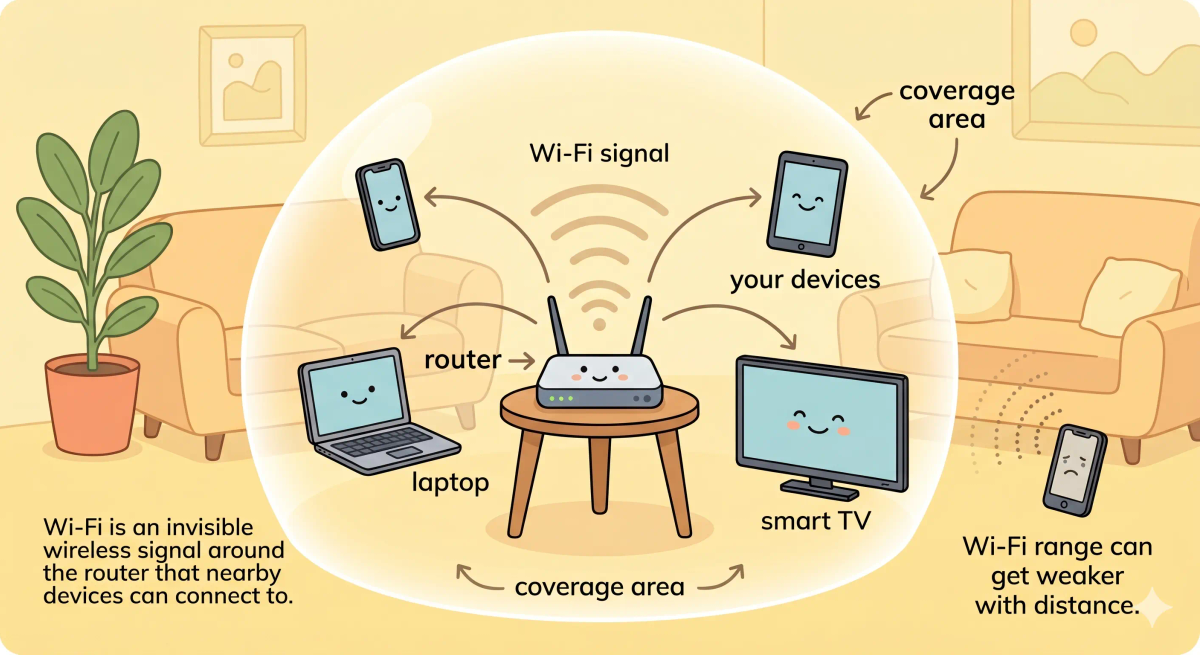
Wi-Fi is a wireless networking technology that lets devices connect to a nearby router or network using radio waves instead of cables.
Main Analogy
Think of Wi-Fi like invisible radio-wave messages between your device and router
- Your phone or laptop = a small radio messenger
- Router = the nearby radio station
- Wi-Fi signal = invisible radio waves carrying messages through the air
- Wi-Fi network name = the station name your device chooses
- Wi-Fi password = the secret code needed to join the station
So the easiest way to understand Wi-Fi is to think of it as an invisible radio-wave connection between your device and a nearby router.
What Problem Does It Solve?
Without Wi-Fi, every phone, laptop, tablet, and smart TV would need a physical cable to connect to the network.
That would be messy and limiting.
In the story world, Wi-Fi solves this by letting devices “talk” to the router through invisible radio-wave messages.
In the real world, Wi-Fi lets devices connect to a local network without plugging in an Ethernet cable.
So the job of Wi-Fi is to make network access wireless and convenient.
How It Works in the Story
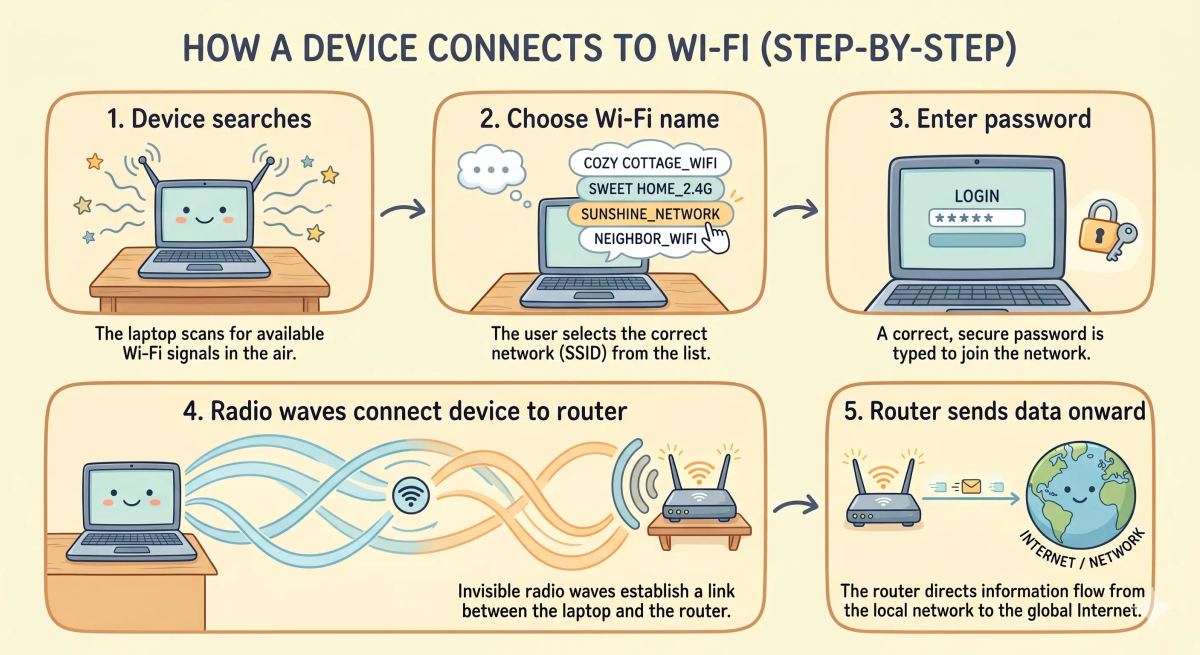
- Your laptop wants to send a message.
- It looks for nearby radio stations.
- It finds your home router’s Wi-Fi network name.
- You enter the correct password to join.
- Your laptop and router start sending invisible radio-wave messages back and forth.
- The router then helps those messages move toward the wider network or internet.
How It Works in the Real World
- Your device scans for nearby Wi-Fi networks.
- You choose a network name, also called an SSID.
- If the network is protected, your device uses the Wi-Fi password to connect securely.
- Your device sends and receives data using radio waves.
- The router passes that data between your device and the rest of the network.
👉 That means Wi-Fi is the wireless link between your device and a nearby network device, usually your router.
Real-World Example
Example: Watching a video on your phone
When you open a video app on your phone, your phone first sends a request over Wi-Fi to your router.
The router then sends that request toward the internet.
When the video data comes back, the router sends it wirelessly to your phone using Wi-Fi radio waves.
That is why your video can play even though your phone is not connected with a cable.
What It Is Not
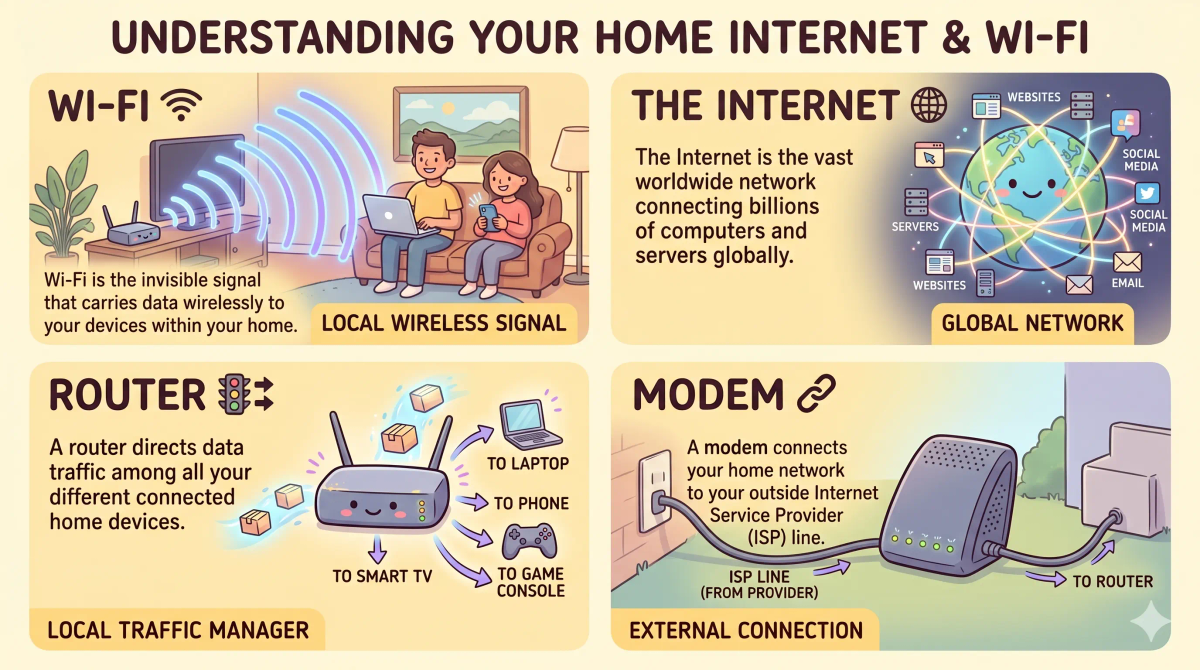
Wi-Fi is not the same as…
- Internet — The internet is the huge global network. Wi-Fi is one way your device connects to a nearby network.
- Router — A router manages network traffic. Wi-Fi is the wireless signal your device uses to reach the router.
- Modem — A modem connects your home network to your internet provider. Wi-Fi connects your device to your local router.
- Mobile data — Mobile data uses your cellular provider’s network. Wi-Fi usually uses a nearby router.
So while these ideas are related, Wi-Fi specifically means wireless local networking using radio waves.
Why It Matters
- It lets devices connect without cables.
- It makes phones, laptops, tablets, and smart TVs easier to use around the home.
- It allows many devices to share one network connection.
- It helps create flexible home, school, office, and public networks.
This matters because Wi-Fi is the invisible link that lets your devices move around while staying connected.
Remember: the next time your phone connects to Wi-Fi, picture it quietly sending tiny radio-wave messages to your router.
A Slightly Deeper Version
A slightly deeper way to think about Wi-Fi is that it is a set of wireless networking standards based on radio communication.
Your device and router use radio frequencies to exchange data. The router then helps move that data to other devices on the local network or out toward the internet.
So Wi-Fi is not the entire internet. It is the wireless bridge between your device and the nearby network.
Common Questions
Is Wi-Fi the same as the internet?
No. Wi-Fi connects your device wirelessly to a nearby router or network. The internet is the larger global network that the router may connect you to.
Do I need a router for Wi-Fi?
In most homes, yes. The router creates the Wi-Fi network that your phone, laptop, or tablet connects to wirelessly.
Why does Wi-Fi get weaker far from the router?
Wi-Fi uses radio signals. Those signals can weaken with distance, walls, furniture, and interference from other devices.
Can Wi-Fi work without internet?
Yes. Devices can connect to a Wi-Fi network even if the internet connection is down, but they may only be able to reach local devices, not websites or online services.
In Short
- Wi-Fi is like invisible radio-wave messaging between your device and router
- Its job is to connect devices wirelessly to a nearby network
- It is different from the internet, router, modem, and mobile data
- It can get weaker with distance, walls, or interference
- It matters because it lets devices stay connected without cables