 What Is an ISP? Explained Simply for Beginners
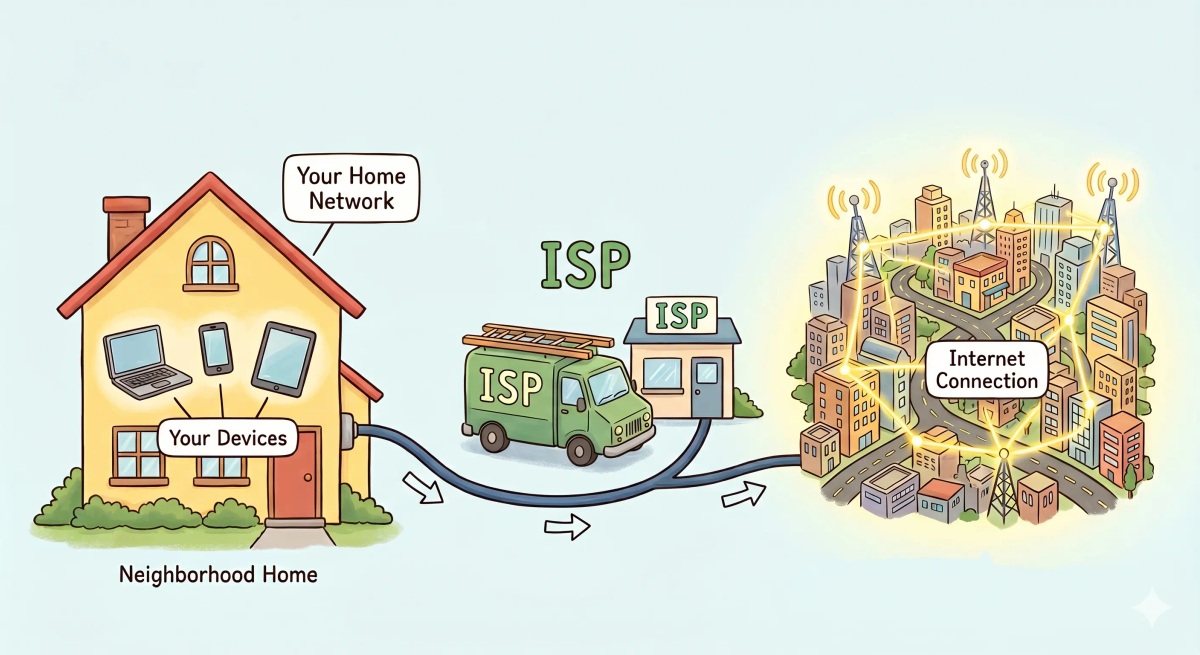
 Imagine your house is in a small neighborhood at the edge of a huge city.
Inside your home, everything is ready. You have your rooms, your lights, and your taps.
But there is one big problem:
Your house does not magically connect itself to the whole city.
For that, you need a company that runs the main lines and brings the service to your home.
That is the easiest way to start understanding an ISP.
An ISP is a company that gives your home or device access to the internet.
Main Analogy
Think of an ISP like a utility company that connects your home to the big city network
- Your home = your house, phone, or local network
- The city-wide utility network = the wider internet
- ISP = the company that connects your home to that bigger network
- Internet plan = the type of service package you buy
- Connection line = the cable, fiber, or wireless path that reaches your home
So the easiest way to understand an ISP is to think of it as the company that brings the “internet service line” from the wider network into your home.
What Problem Does It Solve?
If there were no utility company connecting your house to the city, your home would stay isolated.
You could still walk around inside your own house, but you would not be connected to the bigger system outside.
In the real world, that means your devices could work locally, but they would not be able to reach websites, videos, apps, and online services across the internet.
So the job of an ISP is to provide the connection that lets your home or device join the wider internet.
How It Works in the Story
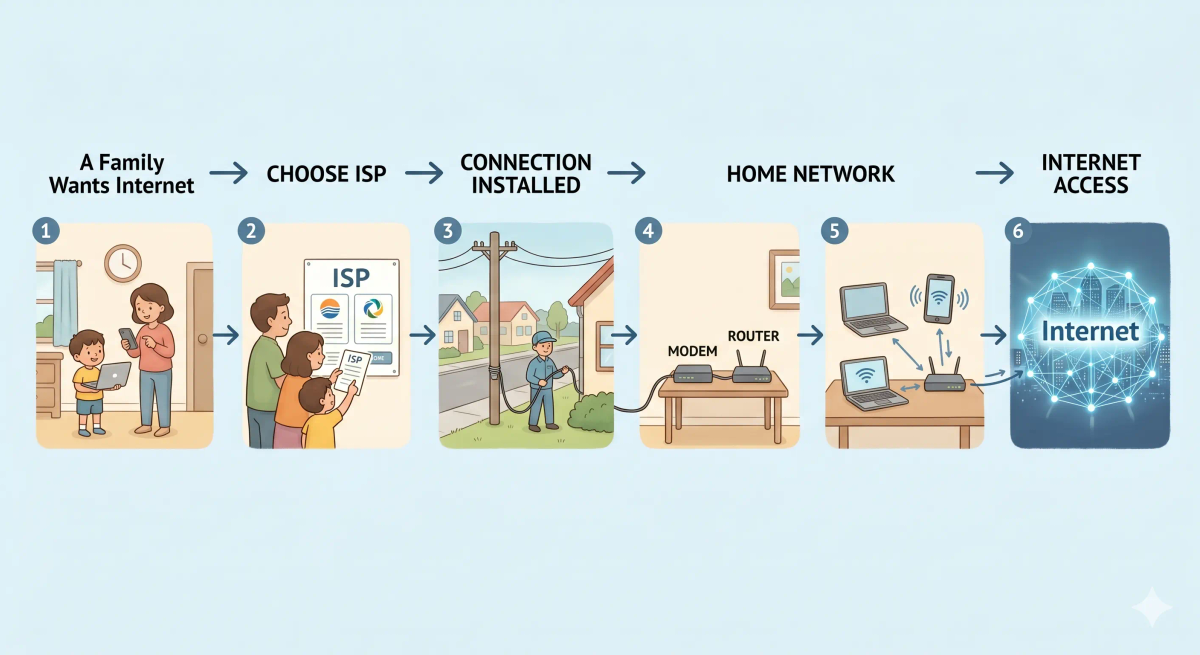
- Your house wants access to the big city utility network.
- A utility company offers to connect your house.
- The company brings a service line to your home.
- Your home signs up for a service plan.
- Now your house can use the larger network beyond the neighborhood.
- Everyone inside the house can benefit from that connection.
How It Works in the Real World
- You choose an internet service provider.
- The ISP provides a connection to your home or device, often through fiber, cable, DSL, or wireless service.
- Your modem and router use that connection.
- Your devices send and receive traffic through the ISP.
- The ISP helps carry that traffic to the wider internet.
👉 That means an ISP is the company that gives you the path out to the internet.
Real-World Example
Example: Opening a video app at home
When you open a video app on your phone at home, your phone does not jump directly onto the internet by itself.
At that moment, your traffic goes out through your home network and then through your ISP.
If everything matches the expected behavior, the ISP helps carry your request to the wider internet, and the video data comes back to your phone.
If not, your internet may feel slow or unavailable because the connection through the ISP is interrupted or weak.
What It Is Not
An ISP is not the same as…
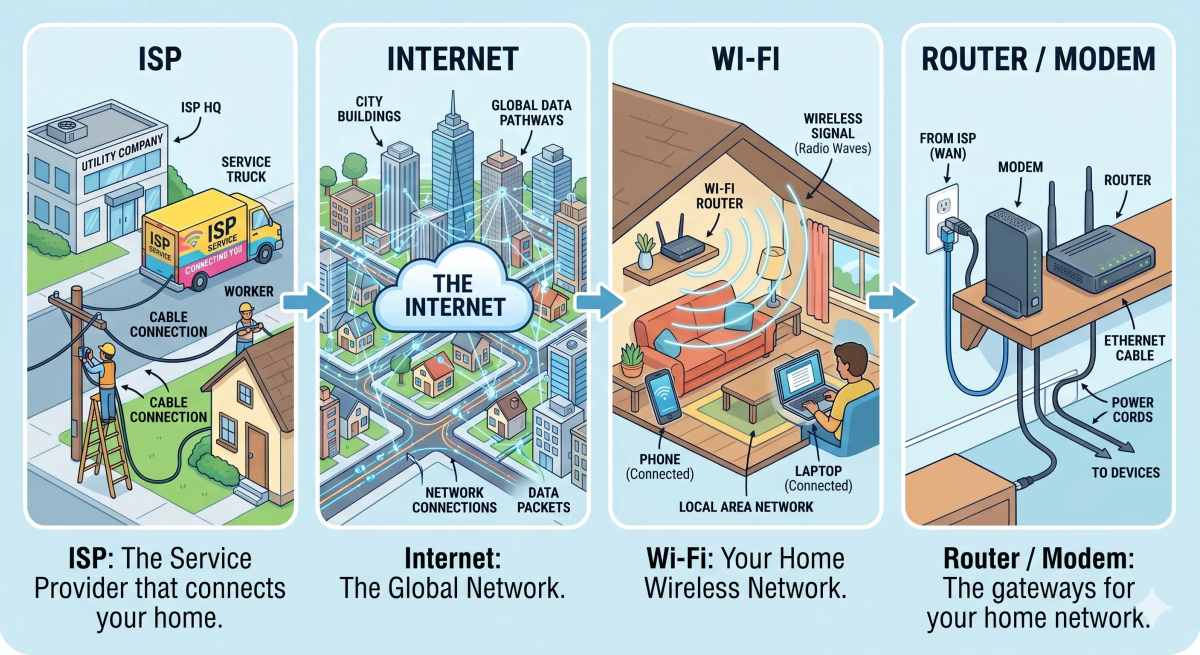
- The internet — the internet is the huge global network, while the ISP is the company that connects you to it
- Wi-Fi — Wi‑Fi is the wireless way your devices connect locally, while the ISP provides the outside internet service
- A router — a router helps direct traffic inside your home network, while the ISP is the service provider outside your home
- A modem — a modem helps your home connection work with the ISP’s line, while the ISP is the company providing the service
So while these ideas are related, an ISP specifically does internet service delivery to your home or device.
Why It Matters
- It gives homes and devices access to the internet
- It makes websites, apps, streaming, and online games possible
- It provides the physical or wireless path to the wider network
- It is the service people usually pay for to get internet access
This matters because an ISP is one of the basic things that makes home internet possible.
The next time your internet works at home, remember that your ISP is the company helping your traffic reach the wider online world.
A Slightly Deeper Version
A slightly deeper way to think about an ISP is that it is an organization that provides internet connectivity and related network services.
It connects customers to its network and then onward to the broader internet. Depending on the type of connection, it may use fiber, cable, DSL, satellite, or wireless systems.
That is why an ISP is not the internet itself. It is your doorway into it.
Common Questions
What is an ISP in simple words?
An ISP is an Internet Service Provider, which is the company that gives you access to the internet. In simple words, it is like a utility company that connects your home to the big internet network.
What does an ISP do?
An ISP provides the connection that lets your home, phone, or business reach the internet. It may also provide equipment, internet plans, technical support, and sometimes email, security, or TV bundles.
Is an ISP the same as Wi-Fi?
No. Wi-Fi is the wireless connection inside your home or building. Your ISP is the company that provides the actual internet service that your Wi-Fi network uses.
Is my ISP the same as my router?
No. Your router is a device in your home that directs traffic between your devices. Your ISP is the company that provides the internet connection coming into your home.
Do I need an ISP to use the internet at home?
Yes, in most normal home setups, you need an ISP to get internet access. Without an ISP or another provider connection, your home network can exist, but it cannot reach the wider internet.
Can an ISP affect internet speed?
Yes. Your ISP, your internet plan, your local network conditions, and the provider’s infrastructure can affect speed, reliability, latency, and connection quality.
How do I choose an ISP?
You can choose an ISP by comparing availability, speed, price, data limits, reliability, customer support, installation fees, contract terms, and whether the plan fits your home’s usage.
Is mobile data from a phone company also an ISP?
Yes. A mobile carrier can act as your ISP when it provides internet access through mobile data, hotspots, or cellular broadband instead of a home cable or fiber connection.
In Short
- An ISP is like a utility company connecting your home to a big city network
- Its job is to give your home or device access to the internet
- It provides the connection path out to the wider network
- It is different from the internet, Wi‑Fi, routers, and modems
- It matters because it is how most people actually get internet service