 What Is a URL? Explained Simply for Beginners
 Imagine you want to send a package to one very specific room inside a huge building in a giant city.
Just knowing the building’s name is not enough.
You may also need to know:
- which delivery method to use
- which building to go to
- which floor or room inside the building
- and sometimes even extra instructions written on the label
That full delivery label is what helps the courier reach the exact place.
That is the easiest way to start understanding a URL.
A URL is the full web address that tells a browser where a resource is and how to reach it.
Main Analogy
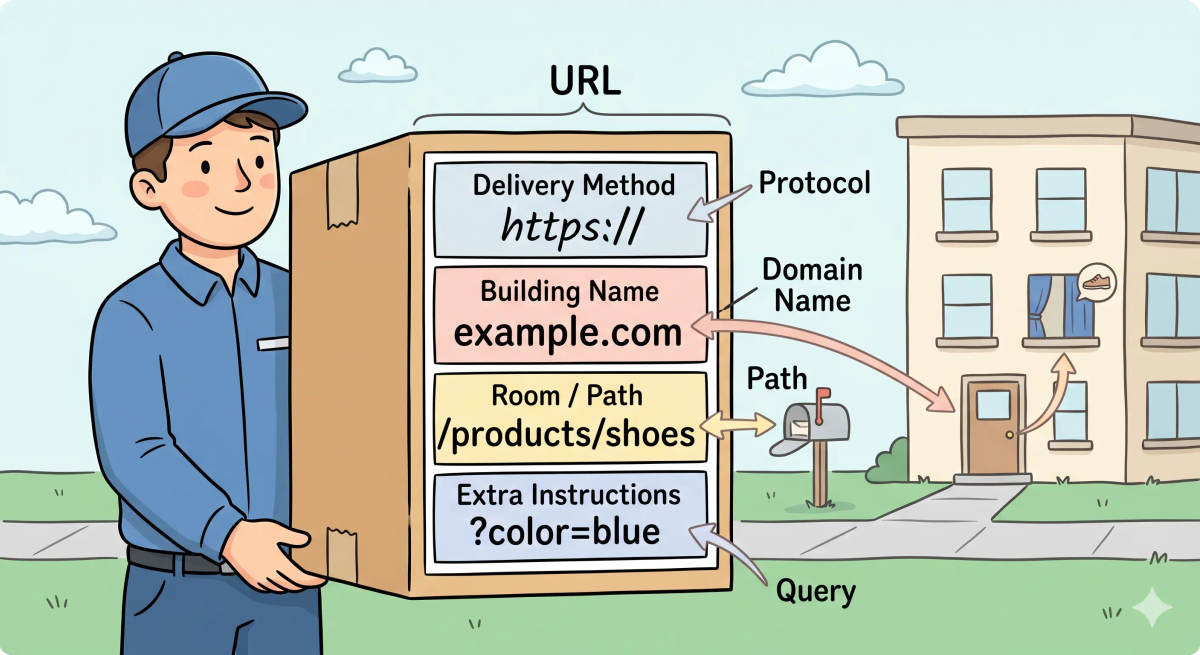
Think of a URL like a full delivery label on a package
- Protocol (
https://) = the delivery method or delivery rules - Domain name (
example.com) = the name of the building or destination - Path (
/products/shoes) = the specific floor, hallway, or room inside the building - Query details (
?color=blue) = extra instructions written on the label - URL = the complete delivery label that tells the courier exactly where to go
So the easiest way to understand a URL is to think of it as the full label that helps a browser reach the exact place or resource you want on the web.
What Problem Does It Solve?
If packages had no full delivery labels, couriers would get confused.
They might know the city. They might even know the building. But they would still not know the exact entrance, room, or instructions needed to deliver the package properly.
In the real world, browsers need more than just a rough name. They need a clear address that says which site to contact, what method to use, and which exact page or resource to request.
So the job of a URL is to give the browser a complete, structured address for finding the right thing on the web.
How It Works in the Story
- You prepare a package for delivery.
- You write a full delivery label on it.
- The label says how the package should be sent.
- It names the correct building.
- It points to the exact room or section inside that building.
- The courier uses that full label to make the delivery.
How It Works in the Real World
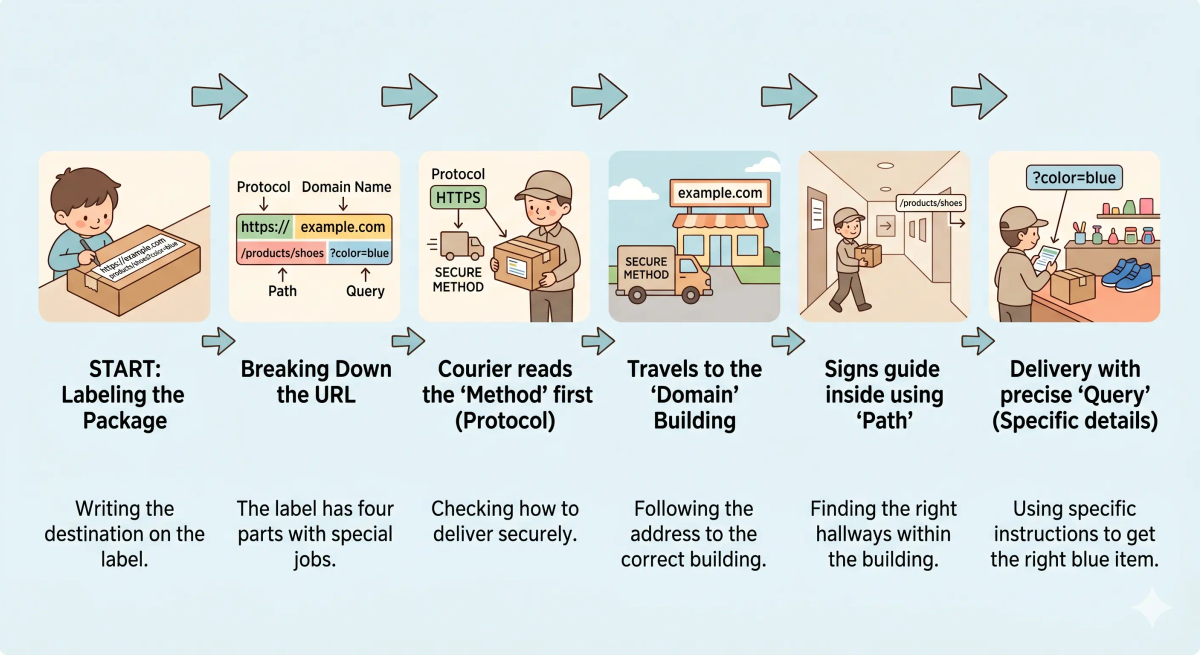
- You type or click a URL in a browser.
- The browser reads the URL and breaks it into parts.
- It sees which protocol to use, such as HTTP or HTTPS.
- It reads the domain name to know which website to contact.
- It reads the path and optional extra details to know which exact page or resource is needed.
- It then begins the process of reaching that resource.
👉 That means a URL helps the browser know where to go and what exactly to ask for.
Real-World Example
Example: Opening a specific product page
When you open a URL like https://shop.com/shoes/running?size=9, your browser does not just see shop.com.
At that moment, the URL tells the browser several things at once:
- use a secure method (
https) - go to the website
shop.com - open the
/shoes/runningpage - and include extra details like
size=9
If everything matches the expected behavior, the browser reaches the exact page you meant to open.
If not, you may land on the wrong page, get an error, or fail to reach the site at all.
What It Is Not
A URL is not the same as…
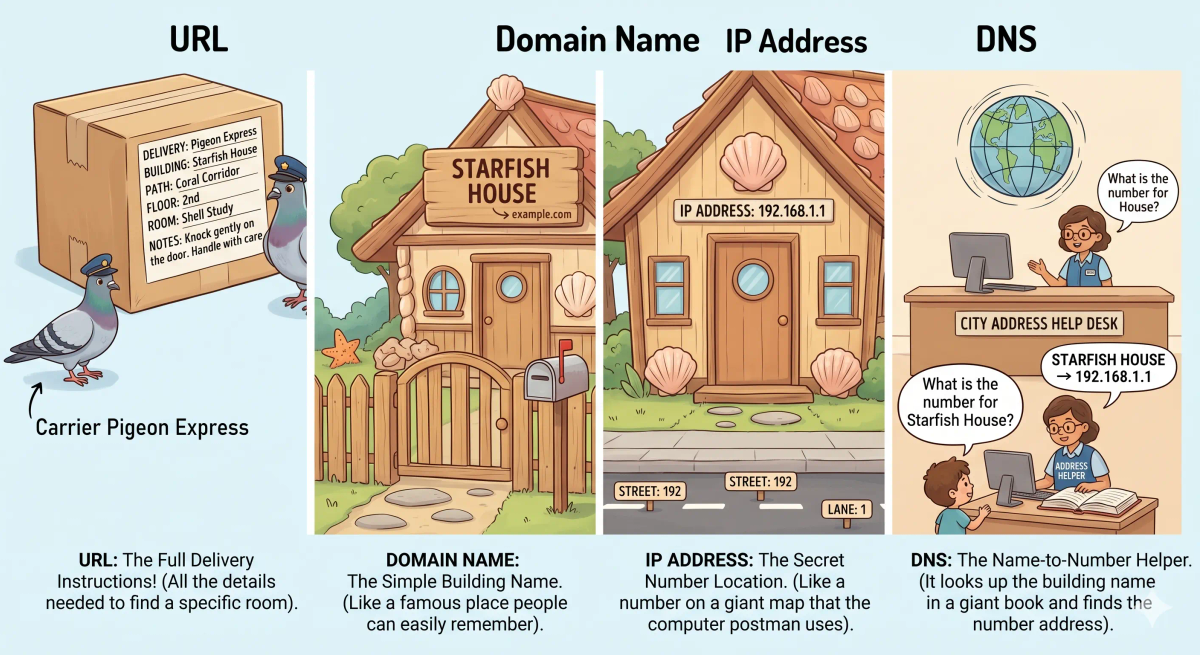
- Domain name — a domain name is just one part of a URL, usually the main website name
- IP address — an IP address is the numeric address computers use, while a URL is the full web address humans and browsers use
- DNS — DNS helps turn the domain name inside a URL into an IP address
- A webpage itself — a webpage is the thing you open, while the URL is the address used to reach it
So while these ideas are related, a URL specifically does full web addressing.
Why It Matters
- It gives browsers a clear way to find web pages and files
- It helps people share exact places on the web
- It lets websites organize many pages under one domain
- It makes the web easier to navigate and understand
This matters because a URL is one of the basic building blocks of how the web is organized.
The next time you copy or click a web address, remember that it is more than just random text. It is a structured set of directions helping your browser reach the right destination.
A Slightly Deeper Version
A slightly deeper way to think about a URL is that it is a standardized locator for resources on the web.
A URL can include a scheme or protocol, a host such as a domain name, a path to a specific resource, and sometimes optional parts like query parameters or fragments. Together, these pieces tell software how to access and identify the exact thing being requested.
That is why URLs are so useful: they are not just names, but structured instructions.
Common Questions
What is a URL in simple words?
A URL is the full address used to find something on the internet. In simple words, it is like a full delivery label that tells the browser exactly where to go and what to ask for.
Is a URL the same as a Domain name?
No. A domain name is only one part of a URL. A full URL can also include the protocol, subdomain, path, query details, and other instructions.
What are the main parts of a URL?
The main parts of a URL can include the protocol, domain name, path, and sometimes extra query parameters. Together, these parts tell the browser how to reach the right resource.
Is a URL the same as a website?
No. A website is the collection of pages or content. A URL is the address that points to a specific page, file, image, video, or other resource.
Can a URL point to a file, not just a webpage?
Yes. A URL can point to many kinds of resources, including webpages, images, videos, PDFs, downloads, API data, and other files.
Do I need to type the whole URL every time?
Not always. Browsers often fill in missing parts, remember visited sites, or search for what you type. But the full URL still exists behind the scenes.
Why do some URLs look long and messy?
Some URLs look long because they include paths, search filters, tracking details, campaign tags, page settings, or other instructions after the main address.
Is a URL the same as a link?
Not exactly. A URL is the actual address. A link is clickable text, a button, or an image that sends you to a URL when you select it.
In Short
- A URL is like a full delivery label on a package
- Its job is to tell the browser exactly where to go and how to get there
- It includes parts like the protocol, domain name, and path
- It is different from a domain name, IP address, DNS, and the webpage itself
- It matters because it helps organize and locate resources across the web