 What Happens When You Type a URL? Explained Simply for Beginners
 Learn what happens when you type a URL using one simple story that makes the whole journey easy to picture.
By the end of this page, you will be able to imagine the full trip: from your browser, to the right server, and back to your screen.
Imagine you are visiting a giant city for the first time.
You know the name of the place you want to visit — maybe a famous library, a toy shop, or a movie theater — but you do not know exactly where it is.
So you look up the name, find the exact address, travel through the city roads, arrive at the building, ask for what you need, and then bring the answer back home.
Typing a URL into your browser works in a very similar way.
You type a human-friendly name, and then a whole hidden journey begins. Your computer has to figure out where that website lives, connect to it, ask for the page, receive the pieces, and build the final result on your screen.
That hidden journey is what happens when you type a URL.
One-Line Answer
When you type a URL, your browser finds the website’s address, connects to the right server, asks for the page, receives the response, and then builds the webpage on your screen.
Main Analogy
Think of what happens when you type a URL like visiting a building in a giant city
- The URL = the place name and directions you type into your travel guide
- The browser = the traveler starting the trip
- DNS = the city information desk that tells you the exact address
- The IP address = the real street address of the building
- Routers and networks = the roads and intersections that guide your trip
- The server = the actual building that has what you came for
- The webpage on your screen = what you see after the trip is complete
So the easiest way to understand what happens when you type a URL is to imagine a traveler trying to find the right building in a huge city, ask for something inside, and bring the result back.
Meet the Key Players
Before we follow the journey, let’s meet the important parts:
- URL — the web address you type, like
https://example.com/page - Browser — the app that begins the request, like Chrome, Safari, or Firefox
- DNS — the helper that translates a website name into the numeric address computers need
- IP address — the actual numeric address of the server
- Router / ISP — the systems that move your request across networks
- Server — the computer that stores the website or service
- HTTP / HTTPS — the rules used to ask for and deliver web content
- HTML, CSS, and JavaScript — the files the browser uses to build the page you finally see
These are the main characters in the story.
What Problem Does This Process Solve?
If there were no city directory, no roads, and no way to find the right building, your traveler would wander around lost.
In the real world, that means your browser would not know where the website lives, how to reach it, or how to bring the right page back.
So this whole process exists to solve one simple problem: when you type a human-friendly web address, your computer needs a reliable way to turn that into a real destination and get the correct content back.
Before the Process Begins
The process begins when you type something like https://example.com into your browser and press Enter.
In the story world, that is like telling your traveler, “Please go visit this place in the city.”
That one tiny action starts the whole journey.
How It Works in the Story
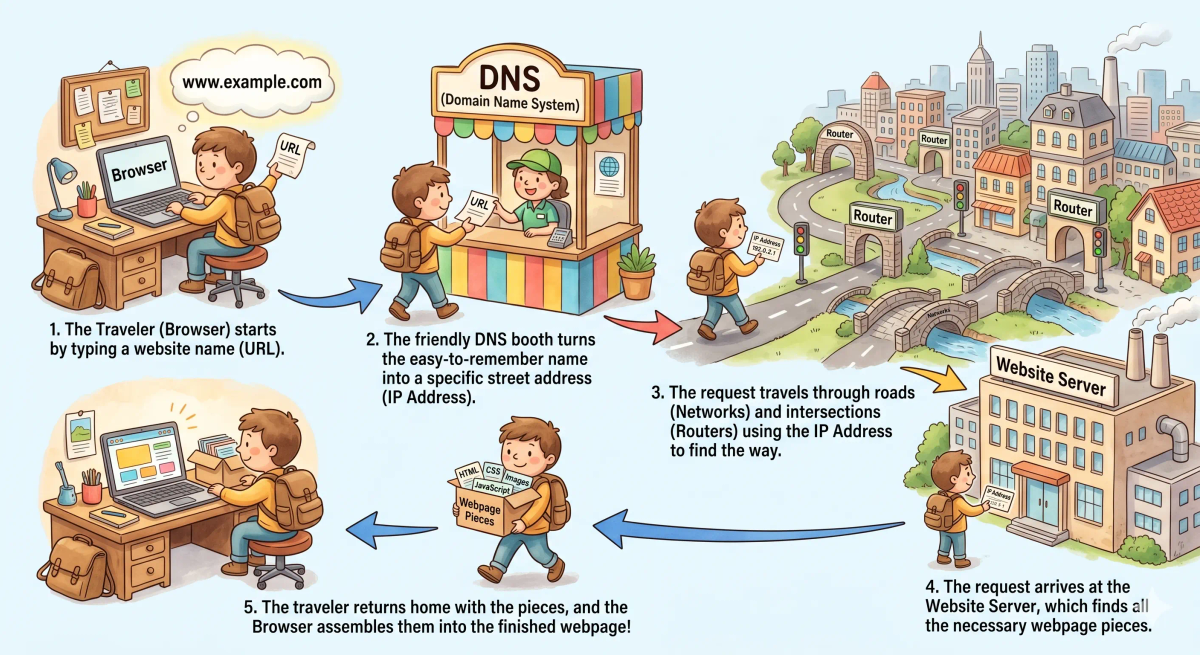
- The traveler is given the place name written on a card.
- The traveler first checks whether they already know the place from an earlier trip.
- If not, they go to the city information desk to ask for the exact address.
- Once they have the street address, they travel through roads and intersections to the correct building.
- At the building, they ask for the exact thing they came for.
- The building staff gathers the needed items and hands them back.
- The traveler returns with the pieces.
- Back at home, the pieces are unpacked and arranged into the final experience.
How It Works in the Real World
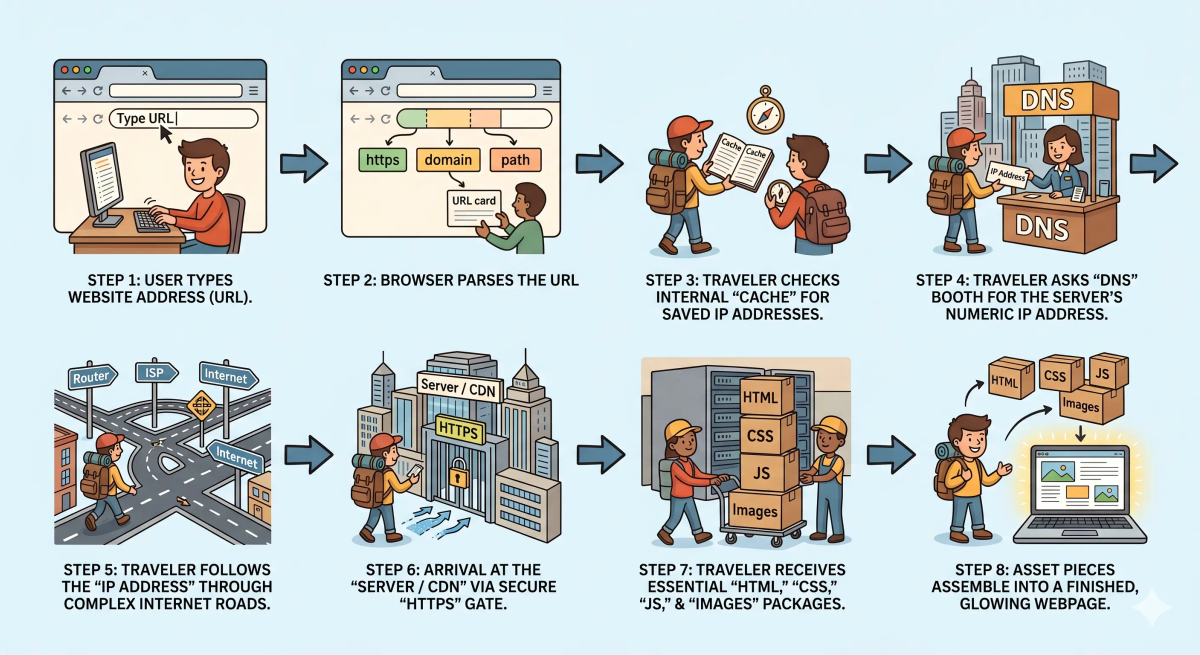
- You type a URL into the browser and press Enter.
- The browser reads the URL and understands things like the protocol (
httporhttps), the domain name, and sometimes the exact path to a page. - The browser checks whether it already knows the answer from cache, such as a remembered DNS result or saved content.
- If it still needs to find the website, it asks DNS to translate the domain name into an IP address.
- Once it gets the IP address, your device begins connecting to the server through your router, ISP, and the wider internet.
- If the site uses HTTPS, the browser and server set up a secure connection first.
- The browser sends an HTTP request asking for the page or resource.
- The server or CDN sends back a response, often starting with HTML.
- The browser reads that HTML and then requests other files like CSS, JavaScript, fonts, and images.
- After receiving those pieces, the browser assembles and renders the final webpage on your screen.
👉 That means what happens when you type a URL is really a full round trip: find the address, connect to the server, ask for the content, receive the pieces, and build the page.
Real-World Example
Example: Typing youtube.com
When you type youtube.com and press Enter, your browser does not magically know everything by itself.
It first reads the URL and figures out what site you want. Then it needs the server’s IP address, so DNS helps it find the right destination. Next, your browser connects across the internet to the correct server or nearby CDN location. It sends a request asking for the page. The server sends back the HTML and other files needed to display the site.
Then your browser gets to work. It reads the files, fetches any extra images, scripts, and styles, and builds the page you finally see.
All of this usually happens in a tiny fraction of a second.
Where the Process Can Slow Down or Go Wrong
Sometimes the process is not instant.
In the story world, that could happen if the traveler cannot find the information desk, the roads are crowded, the destination building is busy, or some needed package arrives late.
In the real world, delays or errors can happen when:
- DNS is slow or fails
- your internet connection is weak
- the server is overloaded
- the secure connection takes longer than expected
- extra page files are large or slow to load
- some files fail to arrive at all
That is why a page can sometimes feel slow, broken, or half-loaded.
What It Is Not
This process is not the same as…
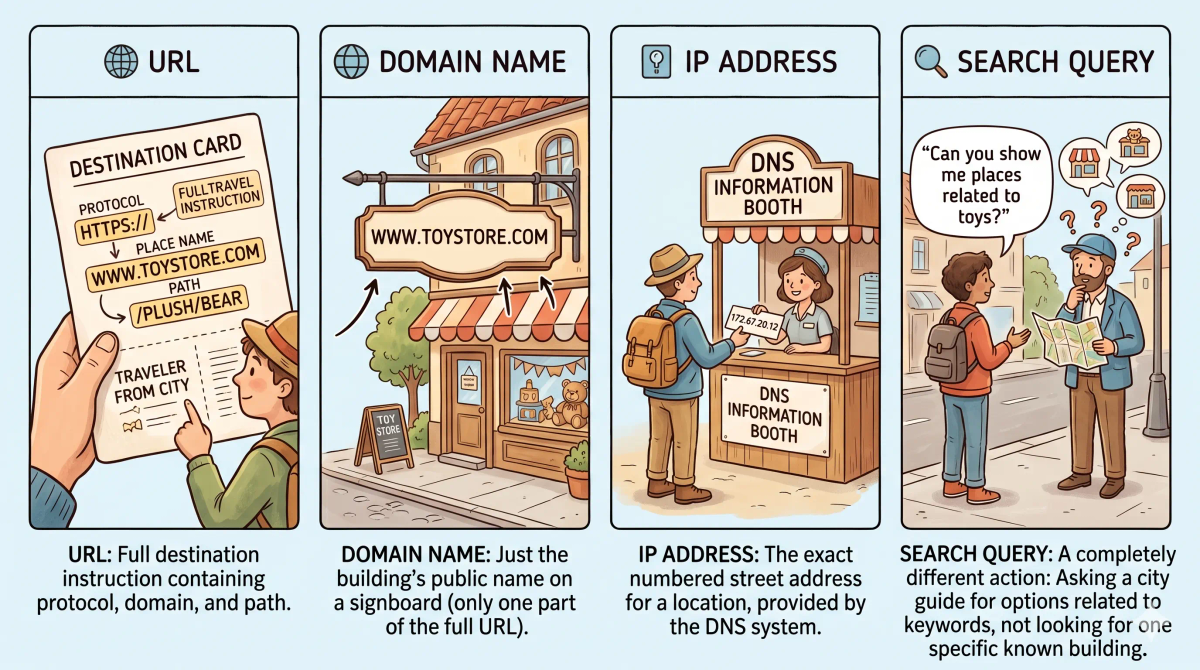
- Typing a search query — a search query asks a search engine to find sites, while typing a URL directly asks for a known destination
- A domain name alone — the domain is just one part of the URL
- An IP address — an IP address is the server’s numeric address, not the full web address you type
- The internet itself — the internet is the larger network system that carries the request, but this page explains the specific journey that starts when you type a URL
So while these are related, what happens when you type a URL specifically explains the end-to-end trip from the browser to the server and back to the rendered page.
Why This Process Matters
- It helps your browser find the correct website quickly
- It connects many foundational concepts into one understandable journey
- It explains why DNS, HTTP, HTTPS, servers, and browsers all matter
- It gives you a mental model for how webpages actually appear
This matters because once you understand this process, many other internet topics suddenly make more sense.
The next time you type a URL, remember that your browser is not just “opening a site.” It is starting a full trip across the internet and back.
A Slightly Deeper Version
A slightly deeper way to understand what happens when you type a URL is that the browser parses the URL, resolves the domain name to an IP address, opens a network connection, negotiates security if HTTPS is used, sends an HTTP request, receives the response, and then processes the returned resources to render the page.
Modern browsers may also use caching, connection reuse, CDNs, compression, prioritization, and multiple parallel requests to make this journey faster.
So even though the result feels simple, a lot of hidden coordination happens underneath.
Common Questions
What is the first thing that happens when you type a URL?
The browser reads the URL and figures out what destination you are asking for.
Does DNS happen every time?
Not always. If the browser or operating system already remembers the answer from cache, it may skip a fresh DNS lookup.
Is typing a URL the same as searching in Google?
No. Typing a URL means you already know the destination. Searching means you are asking a search engine to help you discover destinations.
Why does the page not appear all at once?
Because the browser often receives the page in pieces and still needs to request images, styles, scripts, and other resources before the final page is complete.
In Short
- Typing a URL is like sending a traveler to a known building in a giant city
- The browser reads the destination and starts the trip
- DNS helps find the exact numeric address
- Networks and routers help the request reach the right server
- The server sends back the files, and the browser builds the webpage on your screen