 Modem vs Router Explained Simply for Beginners
 If both boxes near your Wi-Fi setup look similar, this page will help you understand what each one actually does.
A modem is like the harbor translator that connects your home island to the mainland internet city.
A router is like the island traffic guide that sends visitors to the right house on your home island.
So the main difference is simple:
- A modem connects your home network to your internet provider.
- A router shares that connection with your devices and directs traffic inside your home.
If you only remember one thing, remember this: the modem brings the internet to your home; the router sends it around your home.
Quick Comparison Table
| Feature | Modem | Router |
|---|---|---|
| Main role | Connects your home to your ISP | Connects your devices to each other and to the modem |
| Simple analogy | Harbor translator to the mainland | Traffic guide inside your island village |
| Works with | ISP line such as cable, fiber, DSL, or cellular | Phones, laptops, TVs, tablets, smart devices |
| Main job | Converts the ISP connection into a usable internet connection | Sends data to the correct device on your local network |
| Wi-Fi? | Usually not by itself, unless it is a combo device | Usually provides Wi-Fi in home networks |
| Can it work alone? | It can connect one device in some setups | It usually needs a modem to reach the internet |
| Best use | Getting internet access from the provider | Sharing and managing that access across many devices |
Story Hook
Imagine your house is on a small island.
Across the water is a huge mainland city full of libraries, shops, offices, and information. You want your island to talk to that city.
But there are two different jobs to solve.
First, your island needs a working bridge or harbor connection to the mainland. Second, once messages arrive on your island, someone must send each message to the correct house.
Those two jobs feel connected, but they are not the same.
That is the easiest way to start understanding modem vs router.
Main Analogy
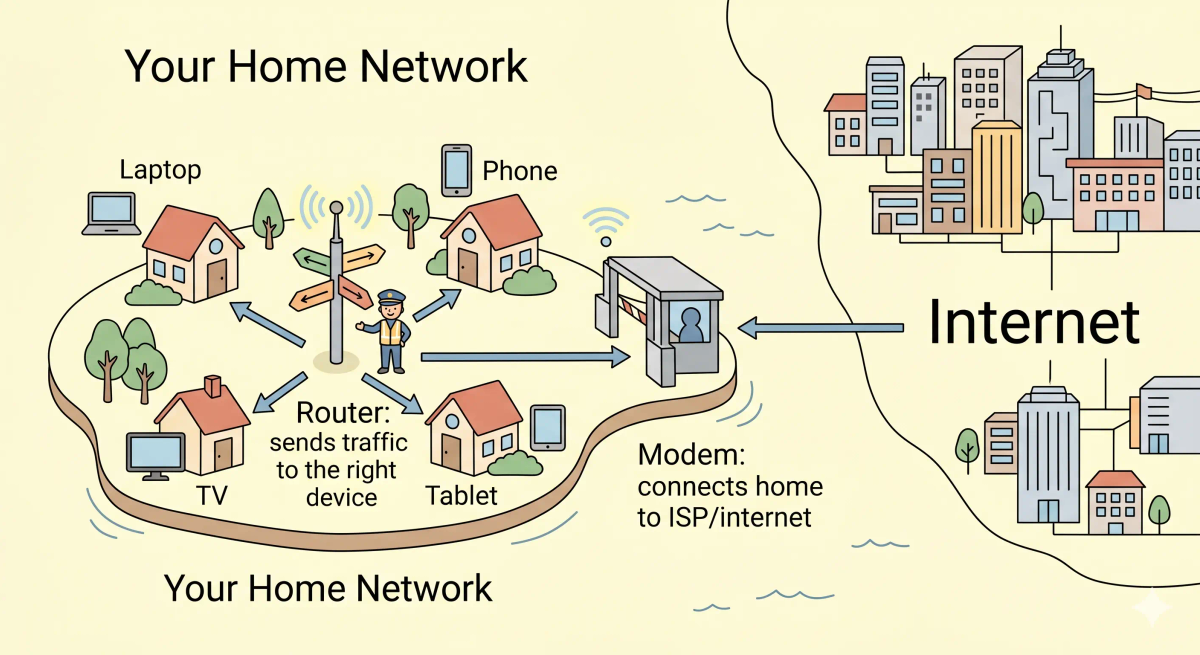
Think of a modem and router like a home island connected to a mainland city
- Mainland city = the internet
- Internet provider = the ferry company or bridge authority
- Your home island = your home network
- Houses on the island = your devices
- Modem = the harbor translator that connects the island to the mainland route
- Router = the island traffic guide that sends each message to the correct house
So the easiest way to understand this comparison is:
- Modem = gets your home connected to the outside internet
- Router = manages where internet traffic goes inside your home
What Problem Does Each One Solve?
Modem
In the island story, the modem solves the “how do we reach the mainland?” problem.
Your home island cannot simply shout across the ocean and expect the city to understand. It needs a connection point that speaks the language of the outside route.
In the real world, the modem connects your home to your internet service provider. It handles the provider-facing connection and turns it into something your home network can use.
Router
In the island story, the router solves the “which house should this message go to?” problem.
Once traffic reaches the island, not every message belongs to every house. A video stream may be meant for the TV. A game packet may be meant for a console. A web page may be meant for your laptop.
In the real world, the router connects your devices together and directs data between your devices and the modem. It often creates your Wi-Fi network too.
The actual difference
In the story world, the modem connects the island to the mainland, while the router directs traffic around the island.
In the real world, that means the modem connects your home to your ISP, while the router shares that connection with your phones, laptops, TVs, and other devices.
So the actual difference is that a modem gets internet access into your home, whereas a router distributes that access inside your home.
How the Difference Works in the Story
Modem in the story
- Your island wants to send a message to the mainland city.
- The message first goes to the harbor translator.
- The harbor translator prepares the message for the ferry route or bridge route.
- The message leaves the island and travels to the mainland.
- Replies from the mainland return through the same harbor checkpoint.
Router in the story
- A message reaches the island from the harbor.
- The island traffic guide checks which house should receive it.
- The guide reads the destination sign.
- The guide sends the message down the correct island road.
- The correct house receives the message, while the other houses are not bothered.
How the Difference Works in the Real World
Modem in the real world
- Your ISP provides a connection to your home through cable, fiber, DSL, cellular, or another access method.
- The modem communicates with the ISP network.
- The modem converts that provider connection into an internet connection your home equipment can use.
- The modem passes that connection onward, usually to a router.
Router in the real world
- Your router connects to the modem.
- Your devices connect to the router using Wi-Fi or Ethernet.
- The router keeps track of which device requested what.
- When replies come back from the internet, the router sends them to the correct device.
- The router may also provide local network features, basic firewall behavior, and Wi-Fi settings.
👉 That means the modem is the outside connection point, and the router is the inside traffic manager.
Real-World Example
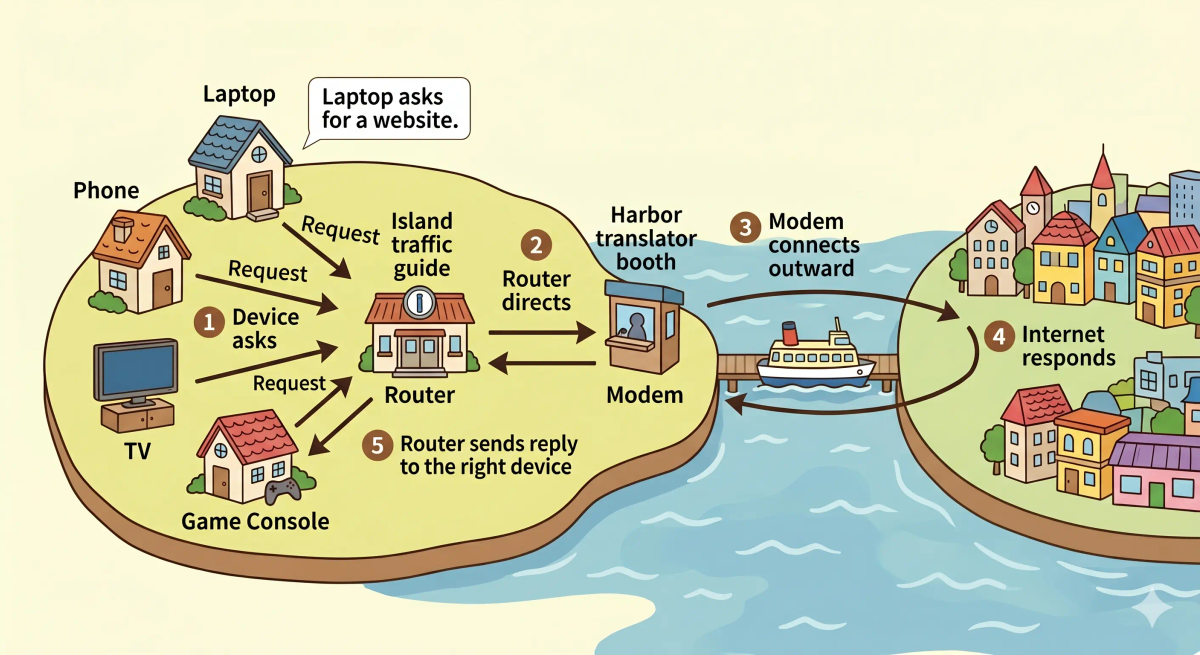
Example: Opening a website on your laptop
When you open a website on your laptop, your laptop sends a request through your home Wi-Fi.
At that moment, the router receives the request and knows it came from your laptop.
Then the router sends the request through the modem, which connects your home to your internet provider and the wider internet.
When the website data comes back, the modem brings it back into your home connection, and the router sends it to your laptop instead of your phone, TV, or tablet.
That is why the difference matters in practice.
The Difference Mapped Clearly
Modem
- Connects your home network to the internet provider
- Handles the outside connection coming into your home
- Usually sits between the ISP line and your router
- Does not usually manage all your home devices by itself
Router
- Connects your devices inside your home network
- Shares the modem’s internet connection with many devices
- Sends each response to the correct phone, laptop, TV, or console
- Often creates the Wi-Fi network you see on your devices
Mental shortcut: Modem = internet entrance, router = home traffic manager.
What Modem and Router Are Not
This comparison is not the same as…
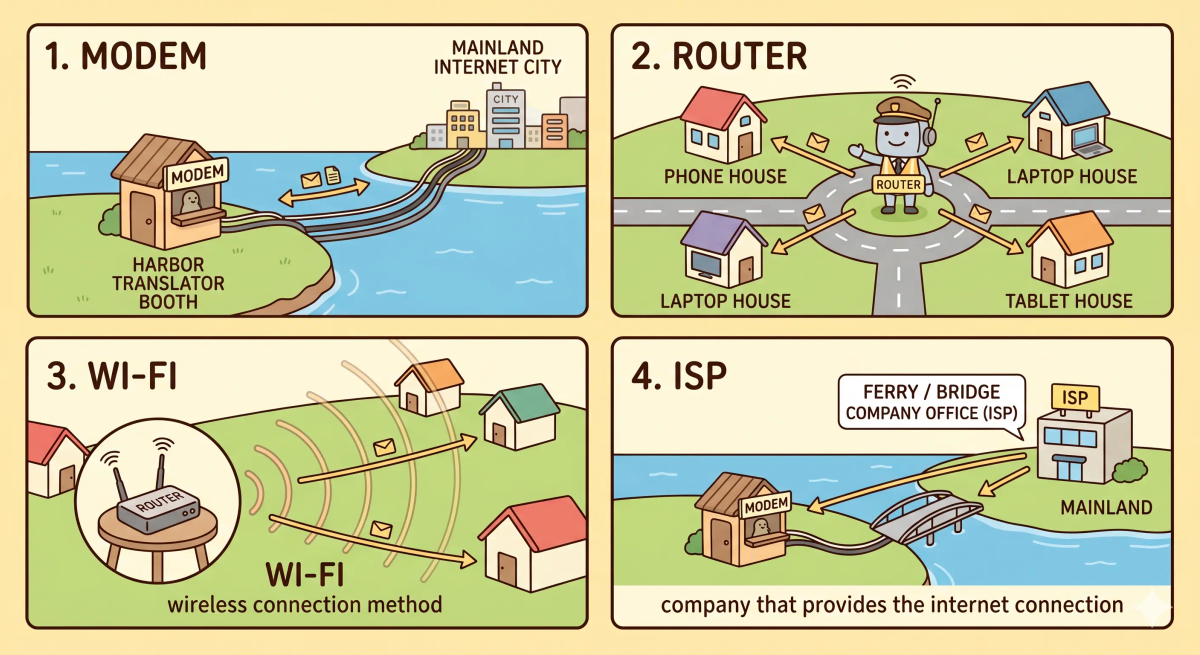
- Wi-Fi — Wi-Fi is the wireless way your device connects to the router; it is not the same as the router itself.
- ISP — the ISP is the company providing internet service; the modem is the device connecting your home to that service.
- Ethernet — Ethernet is a wired connection method; it can connect devices to routers, modems, or switches.
- Switch — a switch connects wired devices inside a local network, but it does not usually connect your home to the ISP.
So while these ideas may be related, the unique job of this comparison is understanding where internet access enters your home and how it gets shared inside your home.
Why the Difference Matters
- It helps you troubleshoot internet problems more clearly.
- It helps you know which device to restart when something breaks.
- It helps you understand what your ISP provides and what your home router controls.
- It helps you choose better home networking equipment.
This matters because modem and router problems can feel identical from the outside: “the internet is not working.” But once you know the difference, you can ask a better question: is the outside connection broken, or is the inside traffic system broken?
The next time you see those boxes near your internet setup, remember: one brings the road to your island, the other guides traffic around the island.
A Slightly Deeper Version
A slightly deeper way to think about this comparison is that a modem handles the link between your home and the ISP’s network, while a router handles traffic between different networks, especially your local home network and the outside internet.
They are often confused because many modern home devices combine both jobs into one physical box. That single box may be called a modem-router, gateway, or Wi-Fi router by your provider.
But even when both jobs live inside one device, the roles are still different: modem = connect to ISP, router = route traffic for devices.
Common Questions
Is a modem the same as a router?
No. A modem connects your home to your internet provider. A router shares that connection with your devices and directs traffic inside your home.
Which is better: modem or router?
Neither is “better” because they solve different problems. You usually need both roles to get many home devices online.
Do I need both a modem and a router?
In many home setups, yes. Sometimes both are combined into one physical device, but the two roles still exist.
Can a router work without a modem?
A router can create a local network without a modem, so your devices may talk to each other. But for normal internet access, the router usually needs a modem or another internet source.
Why do people confuse modem and router?
People confuse them because they are often placed next to each other, look like similar black boxes, and are sometimes combined into one device.
In Short
- A modem is like the harbor translator connecting your home island to the internet city.
- A router is like the traffic guide sending messages to the right house on your island.
- The main difference is that the modem connects outward, while the router directs inward.
- Use a modem to connect your home to your ISP.
- Use a router to share that connection with your devices.