 What Is Cache? Explained Simply for Beginners
 Imagine a chef working in a busy kitchen.
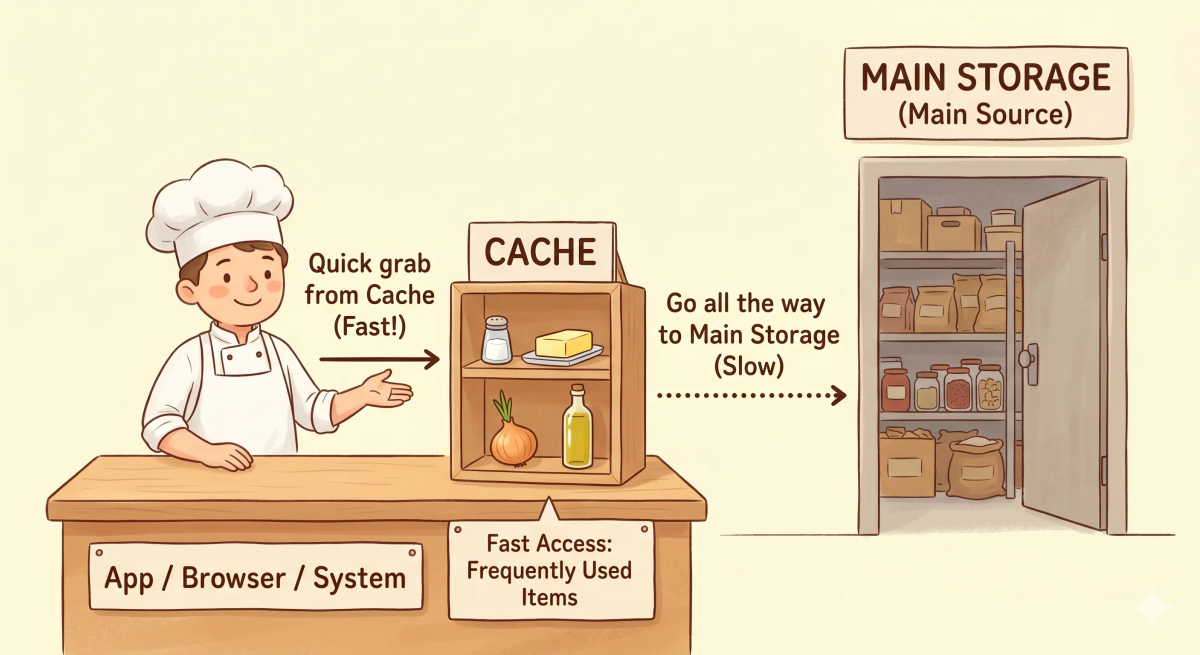
At the back of the kitchen, there is a giant storage room full of ingredients. The chef could walk all the way there every single time they need salt, butter, or onions.
But that would be slow.
So instead, the chef keeps the most commonly used ingredients on a small shelf right next to the cooking station.
Now, when the chef needs something again and again, they can grab it quickly without running back to the big storage room each time.
That is the easiest way to start understanding cache.
A cache is a temporary storage area that keeps frequently needed data nearby so it can be used faster.
Main Analogy
Think of cache like a small ingredient shelf near a busy chef
- Main storage room = the slower original source of data
- Small shelf near the chef = the cache
- Frequently used ingredients = commonly requested data
- Chef = the app, browser, or system asking for the data
- Fast reuse = getting the data quickly without fetching it again from far away
So the easiest way to understand cache is to think of it as a nearby shortcut shelf that stores commonly needed things to save time.
What Problem Does It Solve?
If the chef had to run all the way to the big pantry every time they needed the same few ingredients, cooking would become slower and more tiring.
The ingredients would still exist, but getting them again and again would waste time.
In the real world, apps, browsers, and servers often need the same data repeatedly.
So the job of cache is to keep frequently needed data close at hand so the system does not have to fetch it from the slower original place every single time.
How It Works in the Story
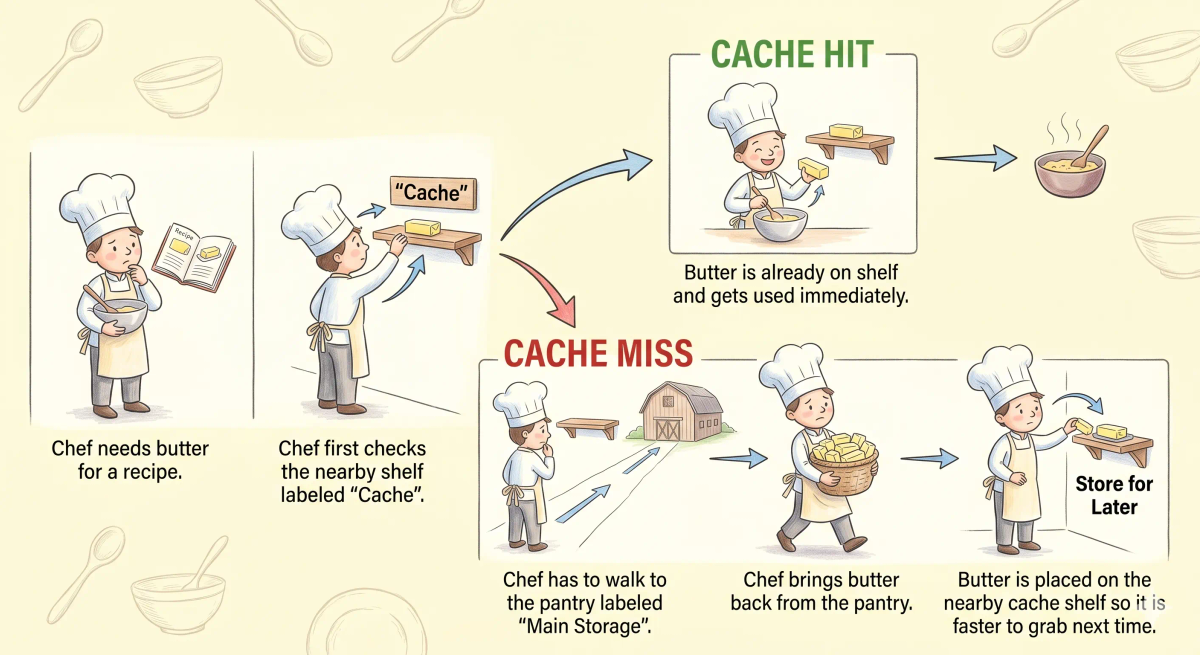
- The chef needs an ingredient while cooking.
- If the ingredient is already on the nearby shelf, the chef grabs it instantly.
- If it is not there, the chef walks to the big pantry and gets it.
- The chef may place that ingredient on the nearby shelf for future use.
- The next time it is needed, it can be grabbed much faster.
How It Works in the Real World
- A browser, app, or system needs some data.
- It first checks whether that data is already in the cache.
- If the data is in the cache, it can use it quickly.
- If not, it fetches the data from the original source.
- The data may then be stored in the cache for later reuse.
👉 That means cache helps systems reuse data faster when the same thing is needed again.
Real-World Example
Example: Opening the same website again
When you type a URL into your browser to open a website, your browser may need images, styles, and other files.
At that moment, cache can help by keeping some of those files nearby after the first visit.
If everything matches the expected behavior, the next visit can feel faster because the browser reuses what it already has cached.
If not, the browser has to fetch everything again from the original source, which can take longer.
What It Is Not
Cache is not the same as…
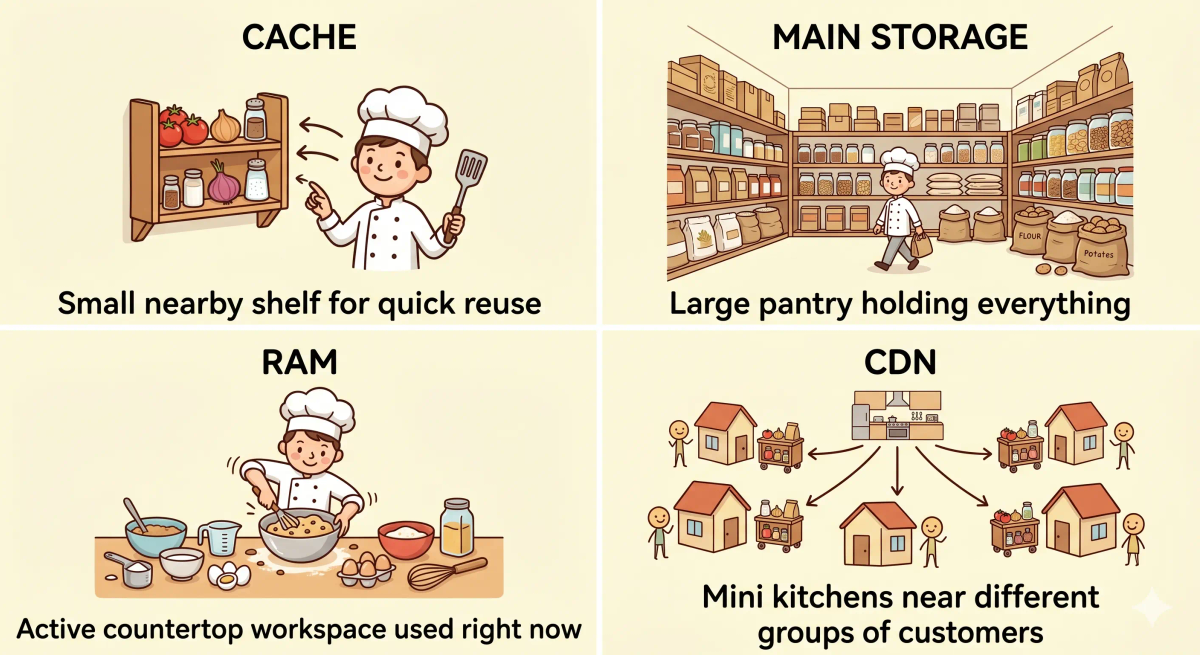
- RAM — RAM is active working memory for running programs, while cache is specifically about keeping frequently needed data closer for faster reuse
- Storage — storage keeps data long-term, while cache is usually temporary and focused on speed
- A database — a database is a main system of record, while cache often stores quick reusable copies of data
- A CDN — a CDN stores content closer to users across many locations, while a cache is the general idea of nearby reusable storage at many levels
So while these ideas are related, cache specifically does temporary nearby reuse for speed.
Why It Matters
- It helps websites and apps feel faster
- It reduces repeated work
- It lowers the need to fetch the same data over and over
- It improves efficiency in many kinds of systems
This matters because cache is one of the simplest and most common ways to speed up computing and networking.
The next time something loads faster the second time, remember that a cache may be helping by reusing what was already fetched before.
A Slightly Deeper Version
A slightly deeper way to think about cache is that it stores temporary copies of frequently accessed data closer to the place where that data is needed.
Caches can exist in browsers, apps, operating systems, databases, servers, and networks. Their main purpose is to reduce delay and repeated work by serving data from a faster nearby layer instead of the slower original source every time.
Common Questions
What is cache in simple words?
Cache is a temporary storage place for things a system may need again soon. In simple words, it is like a small ingredient shelf near a busy chef, so commonly used items are close by and easy to grab.
How does cache work?
Cache works by saving a copy of data, files, or results after they are used once. The next time the same thing is needed, the system can use the nearby cached copy instead of fetching it again from far away.
Is cache good?
Usually yes. Cache often makes websites, apps, and devices faster because they do not have to reload the same information again and again.
Why do people clear cache?
People clear cache when cached data becomes old, incorrect, broken, or out of sync. Clearing it forces the browser, app, or system to fetch a fresh copy.
What happens when you clear cache?
When you clear cache, stored temporary copies are removed. Some websites or apps may load a little slower at first because they need to download or rebuild those files again.
Is cache permanent?
Usually not. Cache is normally temporary. It may be replaced, refreshed, expired, or cleared automatically when the system needs space or newer data.
Is cache the same as cookies?
No. Cache stores temporary copies of files or data to make things faster. Cookies usually store small pieces of information about you, your session, or your preferences.
Can too much caching cause problems?
Yes. If cached data becomes stale, users may see old information, broken pages, or outdated results until the cache is refreshed or cleared.
In Short
- Cache is like a small ingredient shelf near a busy chef
- Its job is to keep frequently needed data nearby for faster reuse
- It helps apps, browsers, and systems work more quickly
- It is different from main storage, RAM, databases, and CDNs
- It matters because it reduces repeated work and speeds things up