 How CDN Works: Explained Simply for Beginners
 Imagine there is a famous bakery in one city that makes the most popular biscuits in the world.
People from every town want those biscuits. But if every single person had to order from that one faraway bakery, the lines would be huge, the delivery trucks would travel forever, and everyone would have to wait.
So what would be smarter?
Instead of keeping the biscuits in just one bakery, you could place fresh biscuit boxes in many small neighborhood shops all around the country. Then when someone wants biscuits, they can get them from the closest shop instead of waiting for a truck from far away.
That is the easiest way to understand how a CDN works.
A CDN works by storing copies of content on many servers in different places, so users can get that content from a nearby server instead of a faraway one.
Main Analogy
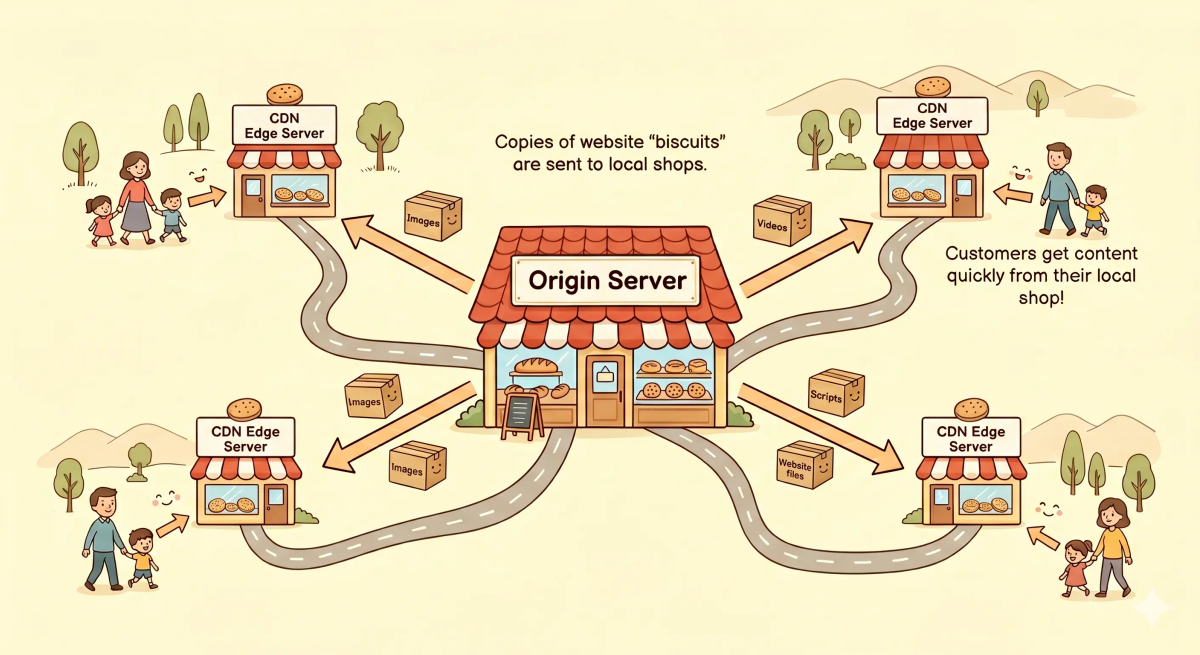
Think of how a CDN works like a network of neighborhood biscuit shops
- The main bakery = the original server where the content first lives
- Biscuit boxes = website files like images, videos, and scripts
- Neighborhood shops = CDN edge servers placed in many locations
- Customers = users visiting the website
- Delivery system = the internet sending content to the user
- The nearby shop network = the CDN
So the easiest way to understand how a CDN works is to imagine one big bakery sharing biscuit boxes with many smaller shops, so customers can pick them up from the nearest place.
Meet the Key Players
Before we follow the journey, let’s meet the important parts:
- User — the person trying to open a website, image, video, or file
- Origin server — the main server where the original content lives
- CDN edge server — a nearby server that stores a copy of the content
- Requested content — the file the user wants, like an image, stylesheet, video, or script
These are the main characters in the story.
What Problem Does This Process Solve?
If there were no neighborhood shops, then every customer would have to wait for biscuits from the one main bakery far away.
In the real world, that means every user would have to fetch content from one distant server, which can make websites slower, especially for users who are far away.
So a CDN works the way it does because it needs to bring content closer to users and reduce the distance that data must travel.
Before the Process Begins
The process begins when a user opens a website or requests some content, like an image, video, or script.
In the story world, that is like a customer walking into the nearest cookie shop and asking, “Do you already have the biscuit box I want?”
That starting moment sets the whole journey in motion.
How It Works in the Story
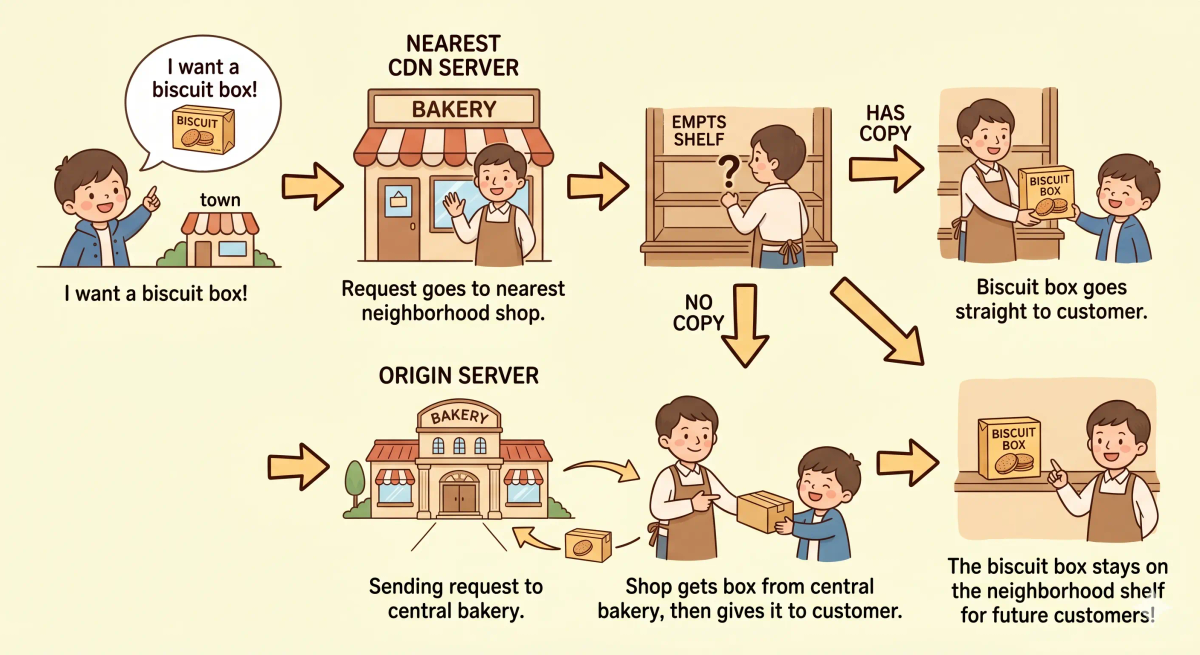
- A customer wants a box of biscuits.
- The customer goes to the nearest neighborhood shop instead of the main bakery.
- The shop checks whether it already has that biscuit box on its shelf.
- If it does, the shop gives it to the customer right away.
- If it does not, the shop asks the main bakery for that biscuit box.
- The main bakery sends the biscuit box to the shop.
- The shop gives the biscuit box to the customer.
- The shop may keep a copy on its shelf so the next nearby customer can get it even faster.
This is why the first request may take longer, but later requests can be much faster.
How It Works in the Real World
- A user opens a website or requests a file.
- The request is directed to a nearby CDN edge server.
- The CDN edge server checks whether it already has the requested content cached.
- If the content is already there, it sends it directly to the user.
- If the content is not there, the CDN edge server requests it from the origin server.
- The origin server sends the content back to the CDN edge server.
- The CDN edge server delivers the content to the user.
- The CDN may keep a cached copy so future nearby users can get it faster.
👉 That means a CDN takes a content request from a user asking for a file to that file being delivered from the nearest useful location through a series of small, fast steps.
Real-World Example
Example: Opening a website with lots of images
When you open a website, your browser asks for many files: images, stylesheets, JavaScript files, maybe even videos.
Then the CDN begins its process: it tries to serve those files from a nearby edge server instead of making every file travel from the faraway origin server.
If everything works properly, the page loads faster and feels smoother.
All of this usually happens so quickly that you never notice it.
Where the Process Can Slow Down or Go Wrong
Sometimes the process is not instant.
In the story world, that could happen if the nearest shop does not have the biscuit box yet, the road back to the bakery is crowded, or the bakery has to prepare a fresh batch before sending it out.
In the real world, delays or errors can happen when the content is not yet cached, the origin server is slow, the requested file has changed and needs a fresh copy, or the network path is congested.
That is why a CDN can sometimes feel slower on the first request and faster on later ones.
What It Is Not
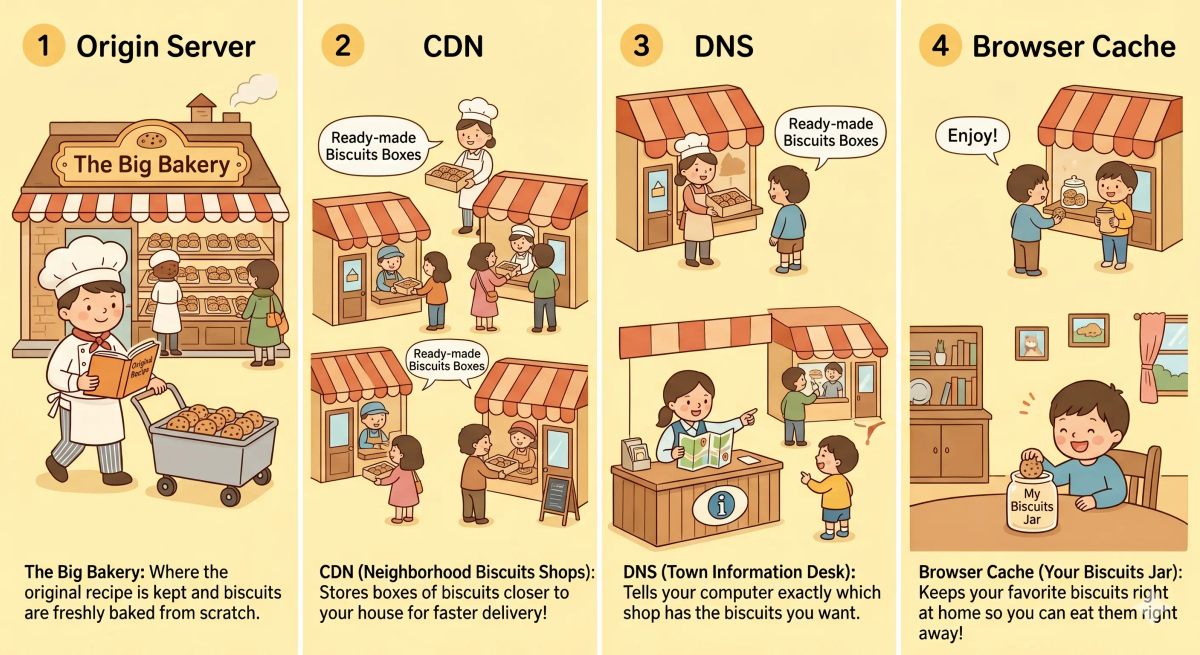
A CDN is not the same as…
- Origin server — the origin server is the main home of the original content, while the CDN stores nearby copies
- DNS — DNS helps find where to go, while a CDN helps deliver content faster once the request is being served
- Browser cache — browser cache stores content on the user’s own device, while a CDN stores content on nearby servers on the internet
- Internet — the internet is the full network that carries data, while a CDN is a delivery layer built on top of it
So while these are related, a CDN specifically explains how content is copied closer to users and served from nearby locations.
Why This Process Matters
- It helps websites load faster for people in different locations
- It reduces the distance content must travel
- It lowers the work done by the origin server
- It makes popular content easier to deliver to many users at once
This matters because a CDN quietly helps websites feel fast, smooth, and reliable. The next time you open a site full of images or watch content online, remember that this invisible delivery system is often helping make it possible.
A Slightly Deeper Version
A slightly deeper way to understand how a CDN works is that it caches static or reusable content on edge servers distributed across many geographic locations.
When a user requests content, the CDN routes that request to a nearby edge location. If the file is already cached there, it is served immediately. If not, the CDN fetches it from the origin, returns it to the user, and may store it for future requests.
Common Questions
What starts a CDN working?
A CDN starts working when a user requests content from a website, such as an image, video, script, or stylesheet.
Does a CDN work every time?
A CDN can help on every request that is configured to go through it, but the biggest speed benefit often comes when the needed content is already cached on a nearby edge server.
Is a CDN the same as DNS?
No. DNS helps turn names into destinations, while a CDN helps deliver content faster from nearby locations.
Why can a CDN sometimes be slow or fail?
It can be slower if the content is not cached yet, if the CDN must fetch it from the origin, or if the origin server itself is slow or unavailable.
In Short
- A CDN works like a network of neighborhood cookie shops
- It starts when a user asks for content
- It first checks the nearest edge server for a copy
- If needed, it goes back to the origin server and then stores a copy closer by
- It matters because it helps websites deliver content faster and more efficiently