 What Is a Server? Explained Simply for Beginners
 Imagine a huge library in a busy city.
Visitors keep walking to the front desk and asking for different things.
One person wants a history book.
Another wants a map.
Another wants today’s newspaper.
Another wants a copy of a form.
The visitors do not search the giant storage rooms themselves. Instead, they ask the library staff, and the staff fetches the right thing and brings it back.
That is the easiest way to start understanding a server.
A server is a computer or system that stores, processes, and sends data or services to other computers when they ask for them.
Main Analogy
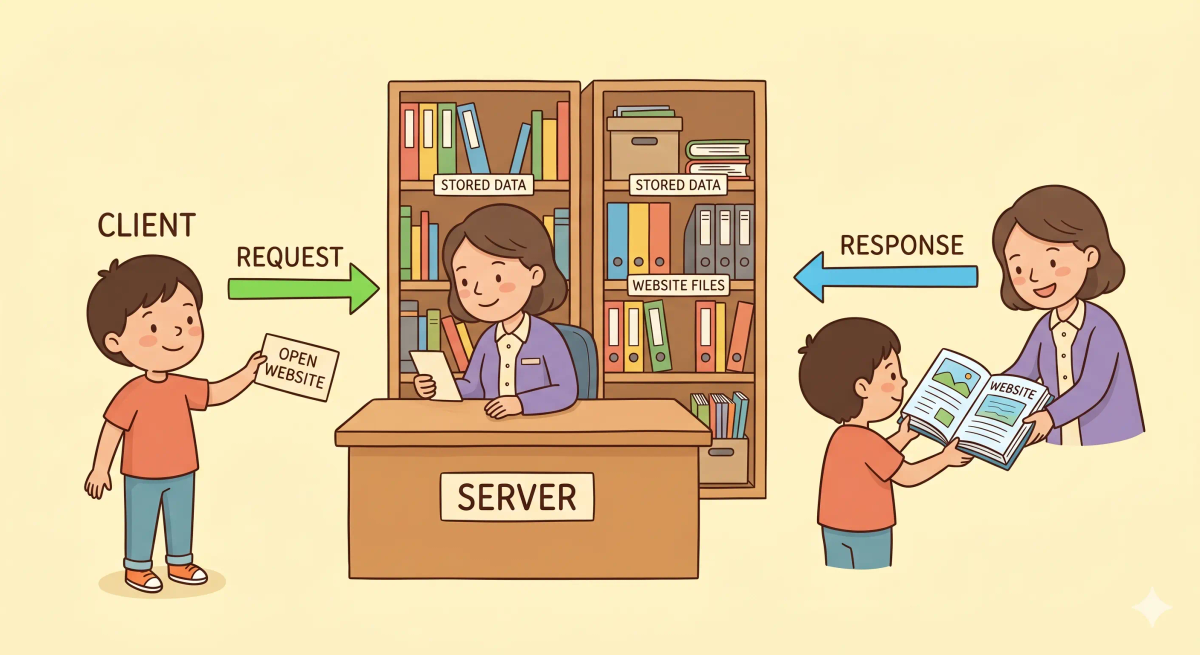
Think of a server like the staff and storage rooms of a busy library
- Your phone or browser = a visitor asking for something
- Server = the library staff and storage system answering requests
- Website files or data = the books, maps, or papers stored in the library
- Request = the question asked at the front desk
- Response = the item the staff brings back
So the easiest way to understand a server is to think of it as the side that waits for requests and then sends back the right thing.
What Problem Does It Solve?
If every visitor had to wander through giant storage rooms on their own, the library would become messy, slow, and confusing.
People might not know where anything is. They might grab the wrong thing or interrupt other work.
In the real world, computers and apps often need one organized system to hold information and answer requests.
So the job of a server is to store resources and provide them to other devices when asked.
How It Works in the Story
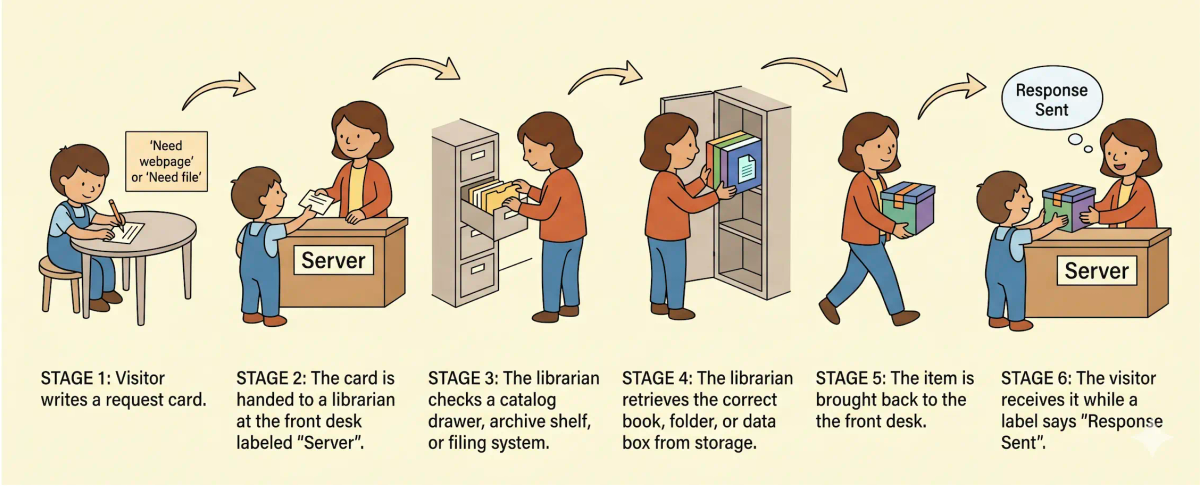
- A visitor walks up to the library desk.
- The visitor asks for a specific book, file, or piece of information.
- The librarian checks the storage system.
- The librarian finds the correct item.
- The librarian brings it back to the visitor.
- The visitor receives exactly what was asked for.
How It Works in the Real World
- Your phone, browser, or app sends a request.
- The request reaches a server.
- The server checks its files, data, or application logic.
- It finds or creates the correct result.
- It sends a response back to the client device.
👉 That means a server helps other devices get the data or service they need.
Real-World Example
Example: Opening a website
When you open a website, your browser needs someone on the other end to provide the webpage files.
At that moment, a server is the system holding those files or generating that content.
If everything matches the expected behavior, the server sends back the page data and the site loads.
If not, the browser may show an error because the server did not respond correctly or was unavailable.
What It Is Not
A server is not the same as…
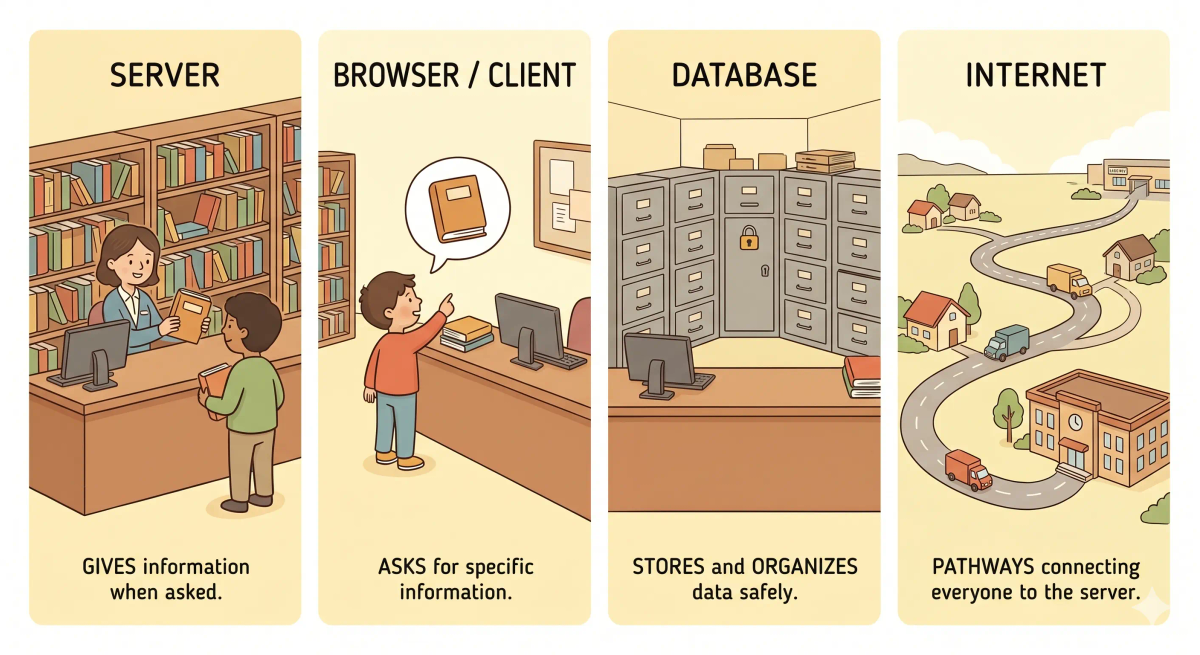
- A browser — the browser asks for information, while the server provides it
- The internet — the internet is the larger network path, while the server is one computer or system on that network
- A database — a database stores structured data, while a server may use a database as one part of its work
- Your personal device — your phone or laptop is often the client in the conversation, not the server
So while these ideas are related, a server specifically does waiting for requests and sending back resources or services.
Why It Matters
- It gives websites and apps a place to store and serve information
- It helps many users ask for resources in an organized way
- It makes online services possible
- It is one of the core building blocks of how the web works
This matters because a server is often the system doing the work on the other side of your request.
The next time a website loads, remember that a server is likely the system finding the right content and sending it back to you.
A Slightly Deeper Version
A slightly deeper way to think about a server is that it is a system that listens for requests from clients and then provides data, files, processing, or other services in response.
A server might host websites, handle APIs, store files, run applications, or work with databases. That is why the word “server” can describe both a role and, in many cases, the computer performing that role.
Common Questions
What is a server in simple words?
A server is a computer or system that provides something to other devices, such as a website, file, app, video, or data. In simple words, it is like a service counter that waits for requests and gives back what people ask for.
How does a server work?
A server works by listening for requests from other devices, processing those requests, and sending back a response. For example, when you open a website, your browser asks a server for the page, and the server sends the page back.
Is a server always a physical machine?
Not always. A server can be a physical computer, a virtual machine, a cloud server, a containerized service, or simply the role a system is performing.
Is a server the same as a website?
No. A website is the content or application you see, while a server is one of the systems that stores, runs, or delivers that website to your browser.
What is the difference between a server and a normal computer?
A normal computer is usually used directly by one person. A server is set up to respond to requests from other computers, often many at the same time.
Can my own computer be a server?
Yes. If your computer is set up to listen for requests and provide a service, such as files, a website, or a game world, it can act as a server.
What are common types of servers?
Common types of servers include web servers, mail servers, file servers, database servers, game servers, DNS servers, and application servers.
Do all apps use servers?
Not all apps use servers, but many modern apps do. Apps often use servers for logins, cloud storage, messages, payments, updates, shared data, and syncing across devices.
In Short
- A server is like a busy library staff and storage system
- Its job is to wait for requests and send back the right information or service
- It helps websites and apps work
- It is different from the browser, the internet, and a database
- It matters because it is often the system answering your requests online