 What Is HTTP? Explained Simply for Beginners
 Imagine you are sitting in a restaurant.
You look at the menu, decide what you want, and then tell the waiter, “I would like a bowl of tomato soup.”
The waiter takes your request to the kitchen. A little later, the waiter comes back carrying your soup.
You asked for something. The restaurant understood your request. Then it sent back the result.
That back-and-forth pattern is the easiest way to understand HTTP.
HTTP is the set of rules that lets a browser ask a server for a webpage or other resource and receive a response back.
Main Analogy
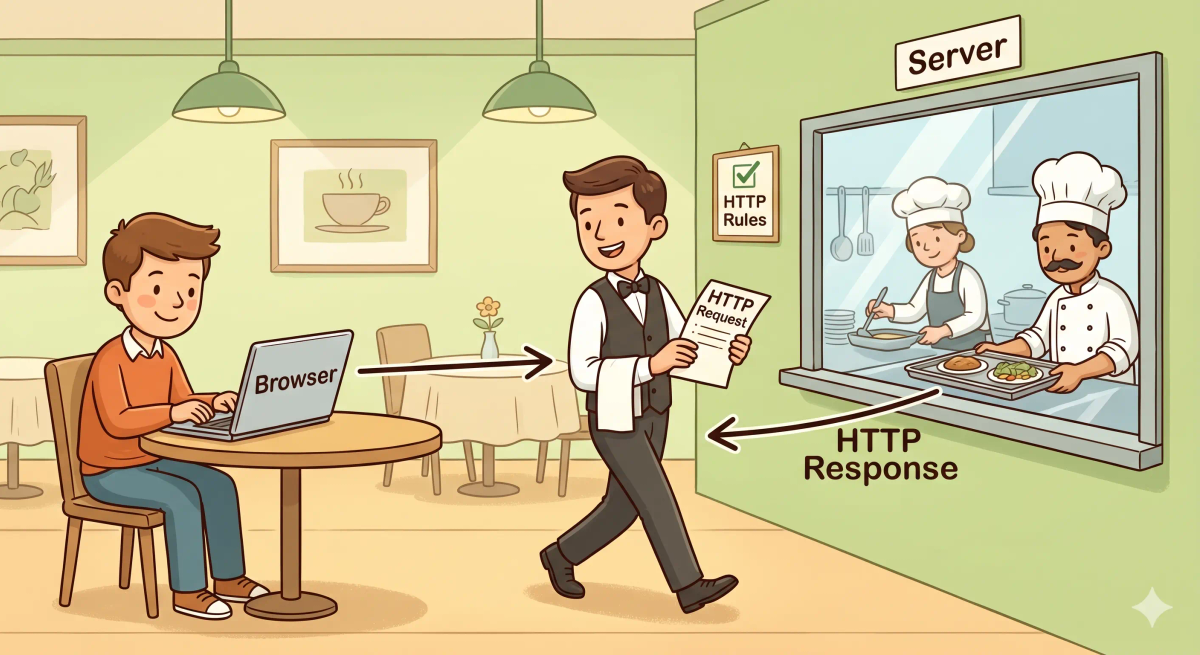
Think of HTTP like the ordering system in a restaurant
- Browser = the customer placing an order
- Server = the kitchen preparing the response
- HTTP request = the order given to the waiter
- HTTP response = the food brought back to the table
- HTTP = the shared rulebook that makes the ordering process work
So the easiest way to understand HTTP is to think of it as the rule system that helps one side ask for something and the other side send it back.
What Problem Does It Solve?
If there were no restaurant ordering system, the customer, waiter, and kitchen would all be confused.
The customer would not know how to ask properly. The kitchen would not know what was needed. And the food might never make it back to the right table.
In the real world, browsers and servers also need a shared way to communicate.
So the job of HTTP is to provide a standard way for one computer to ask for a resource and for another computer to respond.
How It Works in the Story
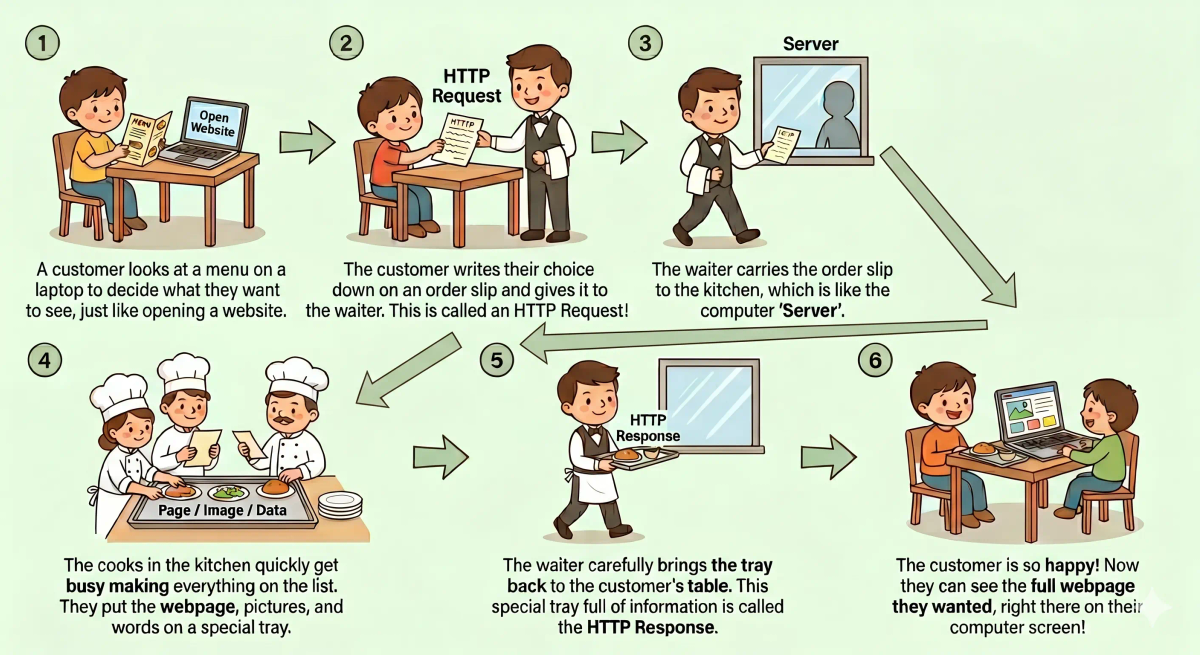
- You sit at your table and decide what you want.
- You tell the waiter your order.
- The waiter carries the order slip to the kitchen.
- The kitchen reads the order and prepares the right item.
- The waiter brings the result back to your table.
- You receive what you asked for.
How It Works in the Real World
- You open a website or click a link in your browser.
- Your browser creates an HTTP request for a page, image, file, or other resource.
- That request is sent to the server where the resource lives.
- The server reads the request and decides how to respond.
- The server sends back an HTTP response.
- Your browser receives the response and shows the result on your screen.
👉 That means HTTP helps browsers and servers communicate in a clear request-and-response pattern.
Real-World Example
Example: Opening a webpage
When you type a website address and press Enter, your browser needs to ask the server for the page.
At that moment, HTTP is part of the conversation. Your browser sends a request asking for the webpage. The server replies with a response that may include HTML, images, or other files.
If everything matches the expected behavior, the page loads on your screen.
If not, you may see an error like “404 Not Found,” which means the server could not return the thing that was requested.
What It Is Not
HTTP is not the same as…
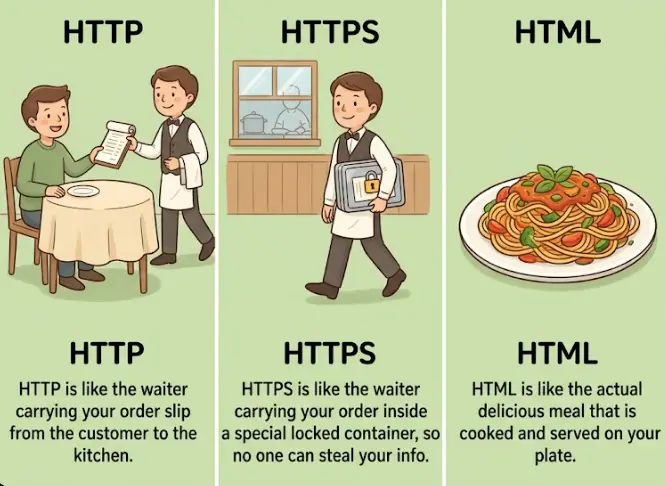
- HTTPS — HTTPS is the secure version of HTTP
- HTML — HTML is the content of a webpage, while HTTP is the way that content is requested and delivered
- Browser — the browser is the tool you use, while HTTP is one of the communication rules it follows
- TCP — TCP helps move data reliably, while HTTP sits higher up and describes the request-and-response conversation
So while these ideas are related, HTTP specifically does the asking and answering between browser and server.
Why It Matters
- It gives browsers and servers a common language
- It makes loading webpages and resources possible
- It creates a simple request-and-response pattern
- It supports much of how the web works
This matters because HTTP is one of the core rules that makes websites usable.
The next time you open a page, remember that your browser is not just “finding” it by magic. It is asking for it in a structured way, and HTTP helps make that possible.
A Slightly Deeper Version
A slightly deeper way to think about HTTP is that it is an application-layer protocol used for communication on the web.
A browser sends an HTTP request that can include things like a method, headers, and the resource it wants. The server then returns an HTTP response with a status code, headers, and usually some content.
That is why HTTP is so important: it gives both sides a clear format for talking to each other.
Common Questions
What is HTTP in simple words?
HTTP is the set of rules your browser and a web server use to talk to each other. In simple words, it is like a restaurant ordering system: your browser asks for something, and the server sends back a response.
How does HTTP work?
HTTP works through requests and responses. Your browser sends an HTTP request asking for a page, image, file, or data, and the server sends back an HTTP response with the result.
Does HTTP only work for webpages?
No. HTTP is often used for webpages, but it can also request images, videos, files, stylesheets, scripts, and data from APIs.
Is HTTP the same as HTTPS?
No. HTTPS is the secure version of HTTP. It does the same basic request-and-response job, but adds encryption and protection.
Is HTTP secure?
Plain HTTP is not secure because the information is not encrypted. That is why most modern websites use HTTPS instead, especially for logins, payments, forms, and personal information.
Do I need HTTP to open a website?
Yes. When you open a website, your browser usually uses HTTP or HTTPS to request the page and receive the content from the server.
What are HTTP status codes?
HTTP status codes are short numbers in the server’s response that explain what happened. For example, they can mean the request worked, the page moved, the page was not found, or the server had an error.
Can HTTP fail?
Yes. HTTP can fail if the server cannot find the resource, has a problem, blocks the request, redirects incorrectly, or if the browser and server cannot communicate properly.
In Short
- HTTP is like a restaurant ordering system
- Its job is to help a browser ask a server for something and get a response back
- It helps webpages, images, and other resources load
- It is different from HTTPS, HTML, the browser, and TCP
- It matters because it is one of the main communication systems of the web