 Firewall vs Antivirus Explained Simply for Beginners
 If both words sound like “computer protection,” this page will help you understand what each one actually protects against.
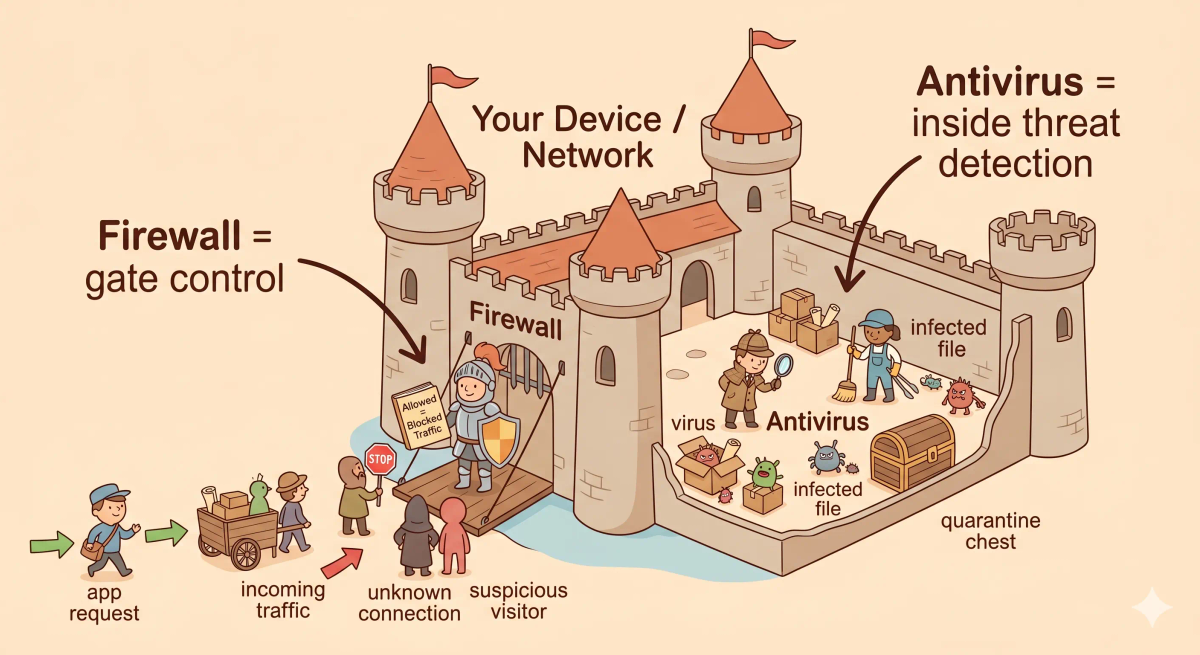
A firewall is like a castle gate guard who checks who is allowed to enter or leave.
Antivirus is like a castle detective and cleanup team that searches inside the castle for hidden enemies or infected items.
So the main difference is simple:
- A firewall controls network traffic coming in and going out.
- Antivirus finds, blocks, quarantines, or removes malicious software on the device.
If you only remember one thing, remember this: a firewall guards the castle gate; antivirus hunts threats inside the castle.
Quick Comparison Table
| Feature | Firewall | Antivirus |
|---|---|---|
| Main role | Controls incoming and outgoing network traffic | Detects and removes malicious software |
| Simple analogy | Castle gate guard | Castle detective and cleanup team |
| Focus | Connections, traffic, ports, rules, access | Files, programs, downloads, malware behavior |
| Main purpose | Stop unwanted or suspicious traffic | Find and deal with malware |
| Where it works | At the boundary of a device or network | Inside the device/system |
| Best use | Blocking risky connections | Catching infected files or malicious programs |
| Memory shortcut | Gate protection | Inside cleanup |
Story Hook
Imagine a castle.
The castle has a large front gate, guards, walls, workers, storage rooms, and treasure rooms. Every day, messengers, merchants, carts, and visitors try to enter or leave.
But there are two very different safety jobs.
One job is to stand at the gate and decide who is allowed in or out.
Another job is to patrol inside the castle, inspect suspicious boxes, find hidden enemies, and clean up anything dangerous that slipped through.
Those two jobs are related, but they are not the same.
That is the easiest way to start understanding firewall vs antivirus.
Main Analogy
Think of a firewall and antivirus like castle security
- Your computer or network = the castle
- Network traffic = visitors, messengers, carts, and packages entering or leaving
- Firewall = the gate guard checking traffic against castle rules
- Files and programs = items, scrolls, tools, and workers inside the castle
- Antivirus = the detective and cleanup team searching inside the castle
- Malware = spies, poisoned scrolls, infected packages, or hidden saboteurs
So the easiest way to understand this comparison is:
- Firewall = protects the castle gate
- Antivirus = protects the inside of the castle
What Problem Does Each One Solve?
Firewall
In the castle story, the firewall solves the “who should be allowed through the gate?” problem.
A castle cannot let every stranger, cart, and messenger enter freely. The guard needs rules. Some visitors are expected. Some are suspicious. Some should be blocked.
In the real world, a firewall controls incoming and outgoing network traffic. It checks connection attempts and decides what should be allowed or blocked based on rules.
Antivirus
In the castle story, antivirus solves the “what if something dangerous is already inside?” problem.
Even with a good gate guard, a poisoned scroll, a fake worker, or a hidden spy might still get inside the castle. Someone has to inspect the rooms, check suspicious items, and remove threats.
In the real world, antivirus scans files, programs, downloads, and system behavior to find malware. If it finds something harmful, it may block, quarantine, or remove it.
The actual difference
In the story world, the firewall controls what enters and leaves the castle gate, while antivirus searches for dangerous things inside the castle.
In the real world, that means the firewall filters network traffic, while antivirus detects and removes malicious software.
So the actual difference is that a firewall focuses on traffic and access, whereas antivirus focuses on malware and cleanup.
How the Difference Works in the Story
Firewall in the story
- A visitor, messenger, or cart arrives at the castle gate.
- The guard checks the castle rulebook.
- If the visitor is allowed, the guard opens the gate.
- If the visitor is suspicious, the guard blocks them.
- The guard also checks some outgoing traffic leaving the castle.
Antivirus in the story
- The detective patrols inside the castle.
- The team inspects scrolls, packages, rooms, and workers.
- If they find a poisoned scroll or hidden spy, they mark it as dangerous.
- The cleanup crew moves the threat into a quarantine chest.
- The dangerous item is removed before it can cause more damage.
How the Difference Works in the Real World
Firewall in the real world
- A device, app, or outside system tries to make a network connection.
- The firewall checks the traffic against rules.
- It may look at things like source, destination, port, app, or connection type.
- It allows safe or expected traffic and blocks unwanted or suspicious traffic.
Antivirus in the real world
- A file, program, or download appears on the device.
- Antivirus scans it for known threats or suspicious behavior.
- If it looks harmful, antivirus warns the user or blocks it.
- It may quarantine or remove the threat so it cannot keep running.
👉 That means the firewall is mainly about controlling traffic at the boundary, while antivirus is mainly about finding threats on the device itself.
Real-World Example
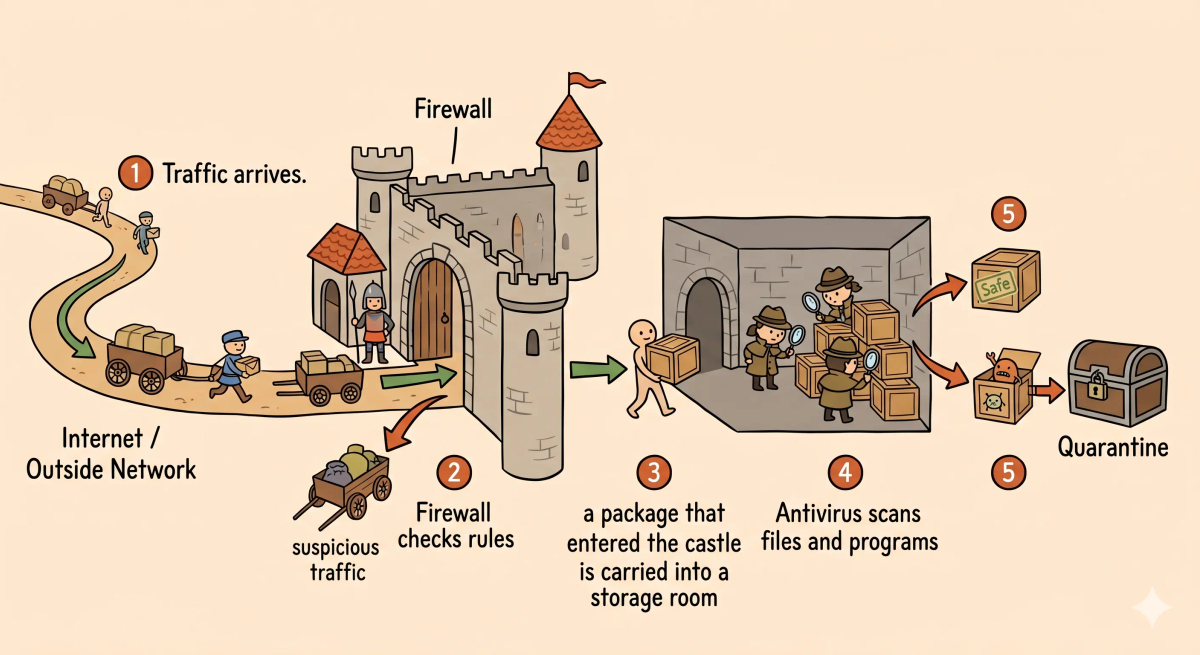
Example: Downloading a file from the internet
When you download a file, your device first communicates with something outside your computer.
At that moment, a firewall may help control whether that connection is allowed. In the castle story, this is like the gate guard checking whether the messenger or cart should enter.
After the file reaches your device, antivirus can scan it. In the castle story, this is like the detective opening the package inside the castle and checking whether it contains something dangerous.
That is why the difference matters in practice: a firewall can help control the connection, but antivirus checks the contents for malware.
The Difference Mapped Clearly
Firewall
- Watches incoming and outgoing network traffic
- Uses rules to allow or block connections
- Helps protect the boundary of a device or network
- Is like a guard at the castle gate
Antivirus
- Scans files, downloads, programs, and behavior
- Looks for malware and suspicious activity
- Can block, quarantine, or remove threats
- Is like a detective and cleanup crew inside the castle
Mental shortcut: firewall = gate guard, antivirus = castle detective.
What Firewall and Antivirus Are Not
This comparison is not the same as…
- VPN — a VPN is like a secret protected tunnel for travel, not a gate guard or inside detective.
- SSL certificate — an SSL certificate is like an official trust certificate at a shop entrance, not malware cleanup.
- Password manager — a password manager safely stores keys, but it does not replace gate security or threat scanning.
- Backup system — backups help restore the castle after damage, but they do not stop or detect threats by themselves.
So while these ideas are related, the unique job of this comparison is understanding gate-level traffic control versus inside-the-device threat detection.
Why the Difference Matters
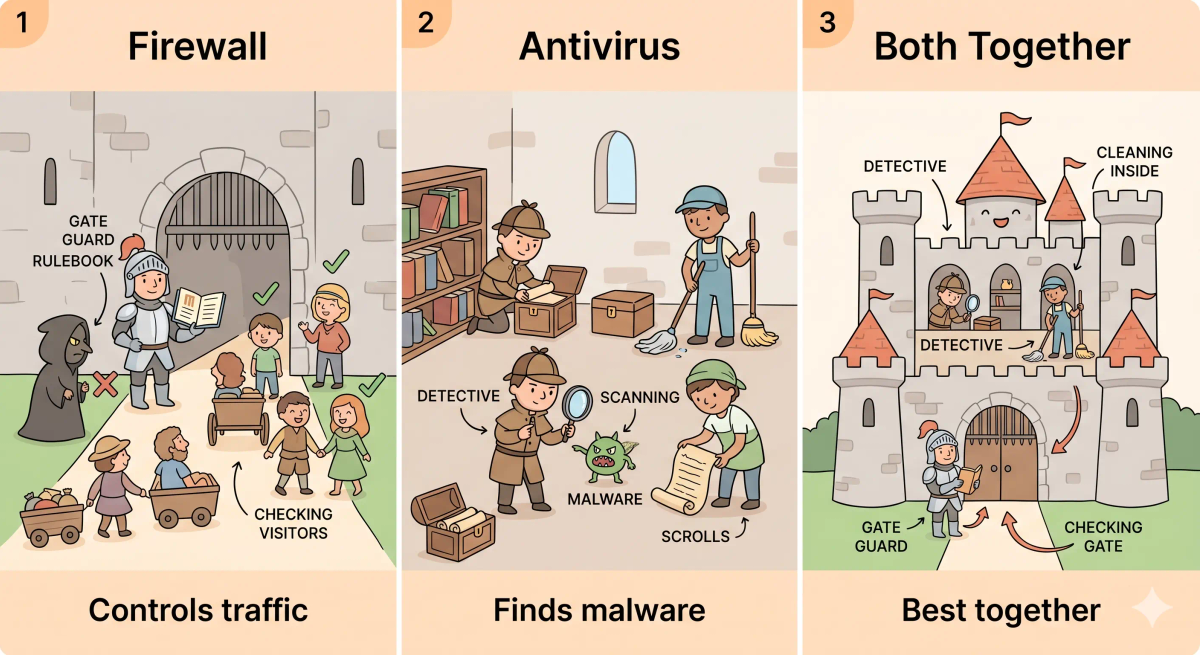
- It helps you understand why one security tool cannot do every job.
- It helps you troubleshoot security warnings more clearly.
- It shows why layered protection is useful.
- It makes cybersecurity terms easier to remember.
This matters because firewall and antivirus are often grouped together, but they protect against different kinds of risk.
A memorable closer: the next time you hear firewall or antivirus, remember the castle: one guards the gate, the other searches inside.
A Slightly Deeper Version
A slightly deeper way to think about this comparison is that a firewall enforces rules for network communication, while antivirus analyzes files, programs, and behavior to detect malicious software.
They may seem similar because both are security tools, but the real distinction is that a firewall focuses on network traffic, while antivirus focuses on malware detection and removal.
Common Questions
Is a firewall the same as antivirus?
No. A firewall controls network traffic, while antivirus finds and removes malware on the device.
Which is better: firewall or antivirus?
Neither is simply better. They do different jobs and are stronger when used together.
Do I need both firewall and antivirus?
In most cases, yes. A firewall helps control traffic, and antivirus helps detect harmful software.
Can antivirus replace a firewall?
No. Antivirus can catch malicious files and programs, but it does not replace traffic-control rules at the network boundary.
Can a firewall remove viruses?
Usually no. A firewall can block suspicious traffic, but antivirus is the tool designed to detect and remove malware.
Why do people confuse firewall and antivirus?
Because both are security tools, and both help protect a device. But they protect different parts of the system.
In Short
- A firewall is like a castle gate guard
- Antivirus is like a castle detective and cleanup crew
- The main difference is that a firewall controls traffic, while antivirus finds and removes malware
- Use firewall thinking when you are talking about allowed or blocked connections
- Use antivirus thinking when you are talking about infected files, malicious programs, or malware cleanup