 What Is a VPN? Explained Simply for Beginners
 Imagine you need to travel across a huge, crowded city.
There are open public roads everywhere. Anyone standing nearby can see which road you are taking and where you seem to be heading.
Now imagine there is a private tunnel entrance near your home.
You step inside, travel through the city hidden from outside view, and come out from another protected exit in a different part of the city before continuing your trip.
You still reach your destination. But the journey looks different from the outside, and much more of it is protected.
That is the easiest way to start understanding a VPN.
A VPN is a service that creates a protected connection between your device and another server, helping hide your traffic from local observers and making it appear as if your traffic is coming from that server instead.
Main Analogy
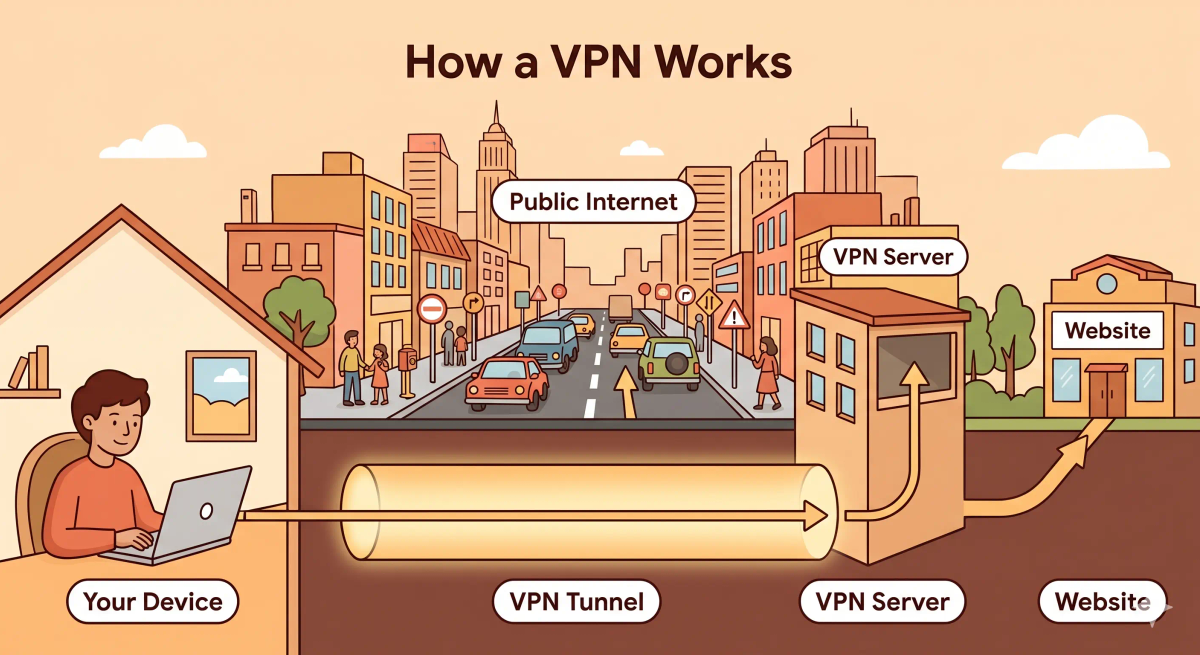
Think of a VPN like a private tunnel through a busy city
- Your phone or laptop = you starting the journey
- Regular internet path = open public roads
- VPN connection = the protected private tunnel
- VPN server = the tunnel exit in another location
- Website or app = the destination building you are trying to reach
So the easiest way to understand a VPN is to think of it as a protected tunnel that carries your trip through part of the journey before sending you out toward the final destination.
What Problem Does It Solve?
If you always had to travel on open public roads, nearby people could more easily watch the first part of your route and learn more about where you were going.
That can be uncomfortable, especially in busy public spaces.
In the real world, when you connect from places like airports, cafés, hotels, or shared networks, your traffic passes through local systems you may not fully trust.
So the job of a VPN is to add a protected path between your device and a VPN server, making that part of the journey harder for local observers to inspect and making your traffic appear to come from the VPN server’s location.
How It Works in the Story
- You start your trip at home.
- Instead of taking the open road right away, you enter a private tunnel.
- You travel through that protected tunnel without outsiders seeing the full path clearly.
- You come out at a secure exit in another part of the city.
- From there, you continue on normal roads toward the final destination.
- To the destination, it looks like your trip began from the tunnel exit area, not directly from your home.
How It Works in the Real World
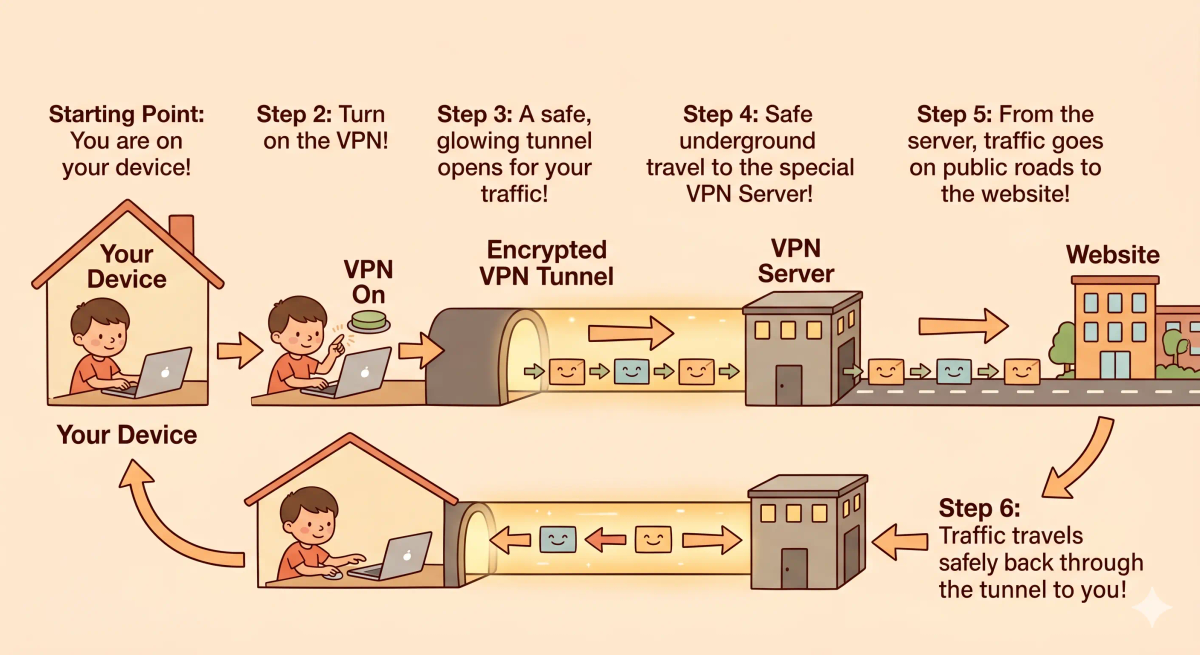
- You turn on a VPN app or connect to a VPN service.
- Your device creates a protected connection to a VPN server.
- Your internet traffic first travels through that protected connection.
- The VPN server then sends your traffic onward to the website or app you are using.
- Responses come back to the VPN server and then through the protected connection back to your device.
- The website sees the VPN server’s IP address instead of your usual local network address.
👉 That means a VPN helps protect the first part of your connection and changes how your traffic appears to websites.
Real-World Example
Example: Using public Wi-Fi in a café
When you connect to public Wi-Fi at a café, you may not want nearby network observers to easily inspect the first part of your connection.
At that moment, a VPN can create a protected path from your device to a VPN server.
If everything matches the expected behavior, your traffic first goes through that protected VPN connection and then continues out to the websites and apps you use.
If not, without a VPN, the local network has a clearer view of your normal traffic path, especially before it reaches outside services.
What It Is Not
A VPN is not the same as…
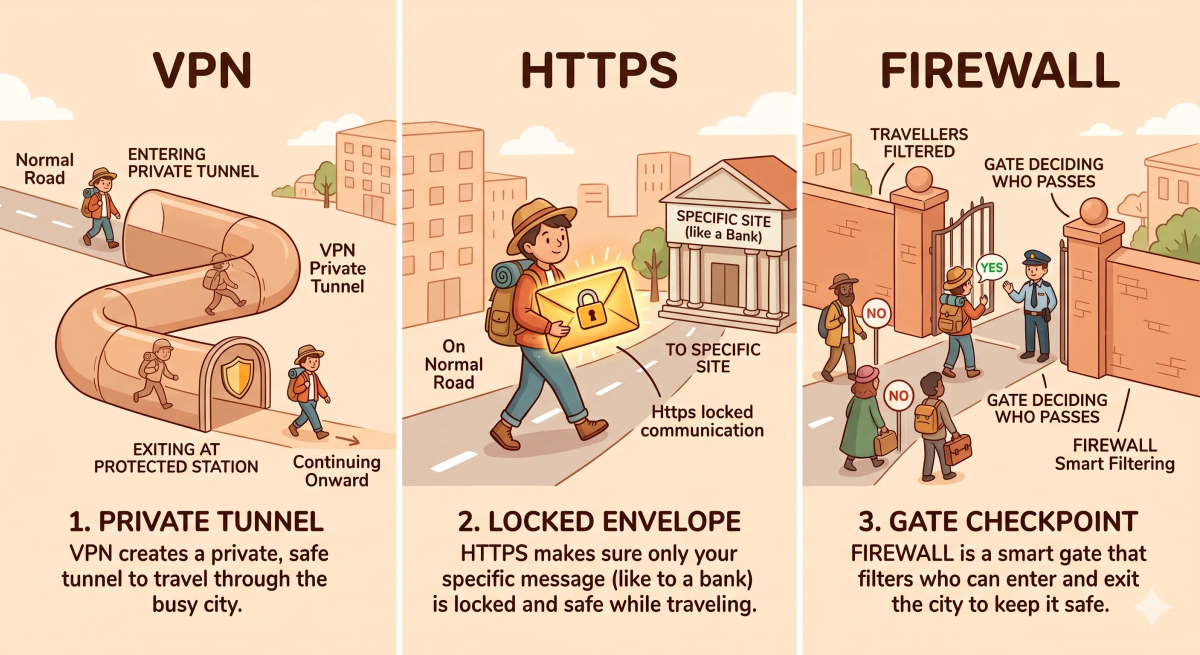
- HTTPS — HTTPS protects your connection to a specific website, while a VPN protects the path between your device and the VPN server
- Incognito mode — incognito mode mainly changes what your own browser saves locally; it does not create a protected tunnel through the network
- A firewall — a firewall filters or blocks traffic, while a VPN reroutes traffic through a protected connection
- The internet itself — the internet is the larger network, while a VPN is one service that changes how your connection travels across it
So while these ideas are related, a VPN specifically does protected rerouting through a VPN server.
Why It Matters
- It helps protect traffic on local networks you may not fully trust
- It can hide your usual network location from the websites you visit
- It gives you a more private path for part of your online journey
- It can help you connect through another location before reaching the final destination
This matters because a VPN helps add privacy and protection to the path your traffic takes.
The next time you use public Wi-Fi or want your connection to appear from another location, remember that a VPN works by putting part of your trip inside a protected tunnel first.
A Slightly Deeper Version
A slightly deeper way to think about a VPN is that it creates an encrypted tunnel between your device and a VPN server.
Your traffic is wrapped and sent through that tunnel first. The VPN server then forwards the traffic onward to the final destination and returns the responses back through the same tunnel. Because of that, the local network mainly sees a connection to the VPN server, and the website mainly sees the VPN server’s IP address.
That is why VPNs are often used for privacy, safer use of public networks, and connecting through another region or network location.
Common Questions
What does a VPN do in simple words?
A VPN creates a protected connection between your device and a VPN server. In simple words, it works like a private tunnel that carries your internet traffic before it goes out to the wider internet.
Does a VPN hide my IP Address?
Yes. A VPN usually hides your real IP address from the websites and services you visit by showing the VPN server’s IP address instead.
Does a VPN make me completely anonymous?
No. A VPN can improve privacy, but it does not make you completely anonymous online. Websites, accounts, cookies, apps, and your own activity can still identify you in other ways.
Is a VPN the same as HTTPS?
No. HTTPS protects the connection between your browser and a specific website. A VPN protects the path between your device and the VPN server.
Do I need a VPN on public Wi-Fi?
A VPN can be useful on public Wi-Fi because it adds a protected tunnel for your traffic. This can help reduce risk when using shared networks in places like airports, hotels, cafes, or schools.
Can a VPN slow down my internet?
Yes. A VPN can sometimes slow down your internet because your traffic takes an extra step through a VPN server and may be encrypted along the way.
Is a free VPN safe to use?
Not always. Some free VPNs may have limits, weaker privacy practices, ads, or data collection. Before using one, it is important to check who runs it, what it logs, and how it makes money.
When should I use a VPN?
You might use a VPN when you want extra privacy on shared networks, need secure access to a work or school network, or want your traffic to pass through a different VPN server location.
In Short
- A VPN is like a private tunnel through a busy city
- Its job is to protect the first part of your internet journey and reroute it through a VPN server
- It helps hide your usual network location from websites
- It is different from HTTPS, incognito mode, firewalls, and the internet itself
- It matters because it adds privacy and protection to how your traffic travels