 What Is an SSL Certificate? Explained Simply for Beginners
 Imagine you are walking through a busy shopping street in a city you have never visited before.
You want to enter a jewelry store because you may need to share something valuable inside. But before stepping in, you want to know one important thing:
Is this really the store it claims to be?
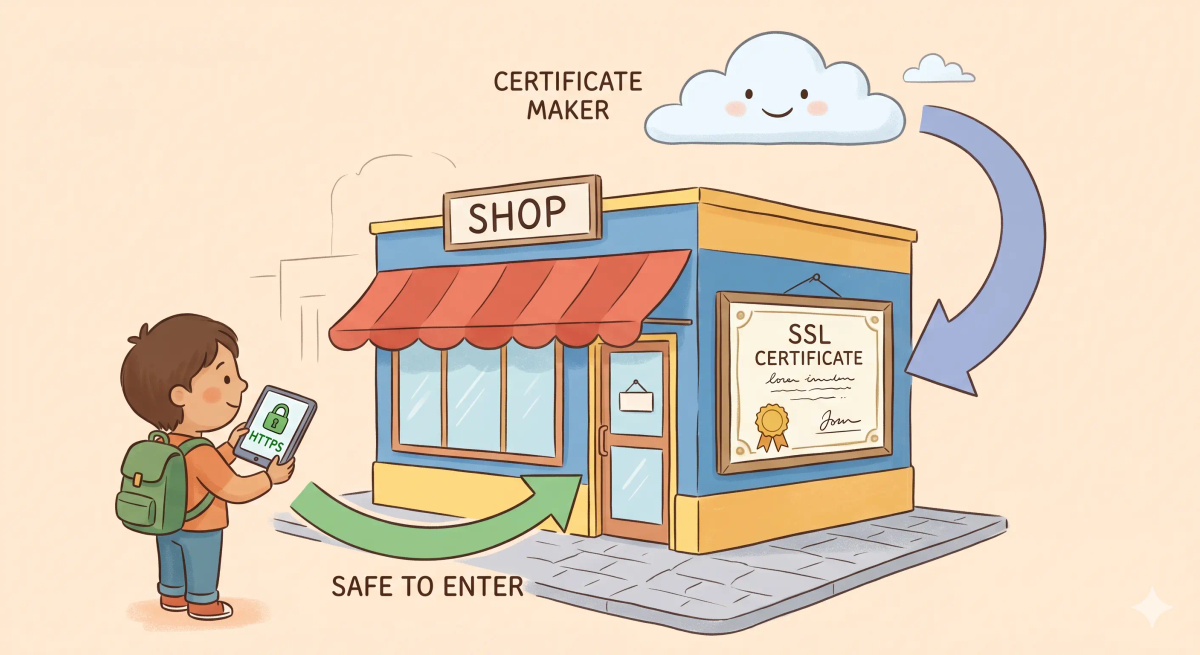
At the front door, you see an official framed business certificate issued by the city. It shows the shop’s name, proves it has been verified, and helps visitors trust that they are entering the real place.
That is the easiest way to start understanding an SSL certificate.
An SSL certificate is a digital certificate that helps prove a website’s identity and supports a secure encrypted connection between your browser and that website.
Main Analogy
Think of an SSL certificate like an official business certificate displayed at a shop entrance
- Website = the shop
- Browser = the visitor checking whether the shop is real
- SSL certificate = the official certificate or license proving the shop’s identity
- Certificate authority = the city office that issued and verified the certificate
- HTTPS secure connection = the trusted, protected conversation that begins after identity is confirmed
So the easiest way to understand an SSL certificate is to think of it as the website’s official proof of identity that helps visitors trust they are talking to the real place.
What Problem Does It Solve?
If shops had no official certificates or licenses, visitors could be tricked by fake storefronts pretending to be trusted businesses.
That would be risky, especially if you were about to share something private like your name, password, or payment details.
In the real world, fake websites can try to look like real ones. Your browser needs a way to check whether a site has verified identity information.
So the job of an SSL certificate is to help prove that a website is genuine and to support a secure connection once that identity is checked.
How It Works in the Story
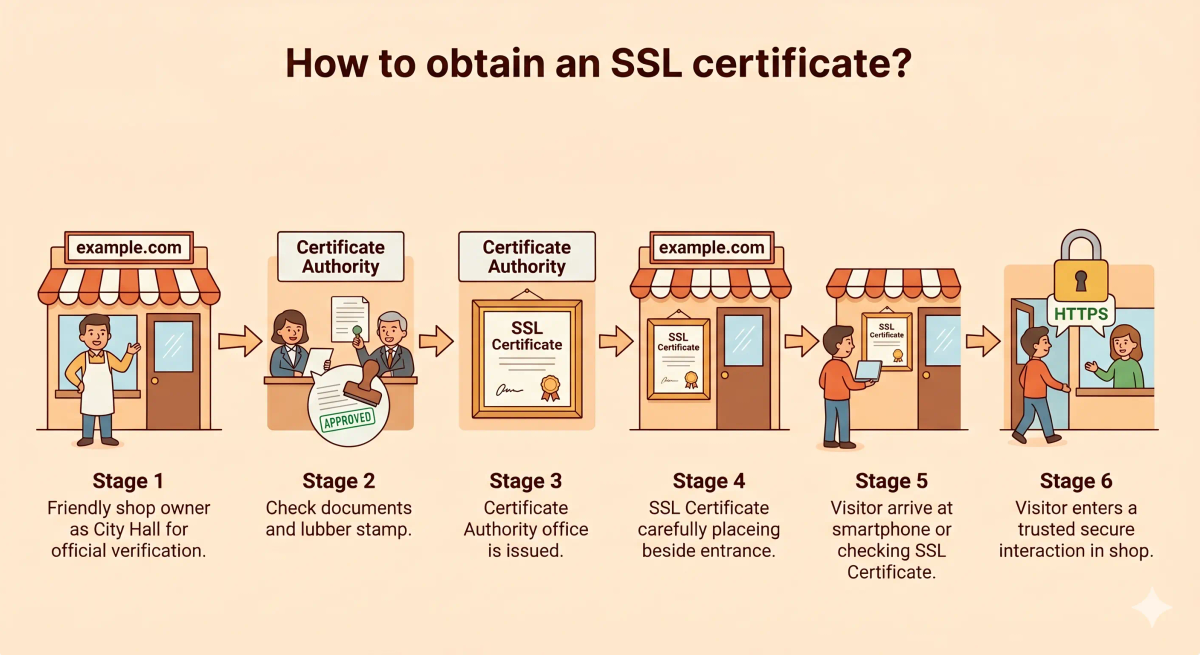
- A shop wants customers to trust that it is real.
- The shop gets an official certificate from the city office.
- The city office checks the shop’s identity before issuing the certificate.
- The shop displays that certificate at the entrance.
- A visitor arrives and checks the certificate before entering.
- Because the certificate is valid, the visitor feels safer trusting the shop.
How It Works in the Real World
- A website owner requests a certificate from a trusted certificate authority.
- The certificate authority verifies control of the domain and, in some cases, additional identity details.
- The certificate is issued to the website.
- When your browser connects, the website presents that certificate.
- Your browser checks whether the certificate is valid and from a trusted issuer.
- If the checks pass, the browser can continue with a secure HTTPS connection.
👉 That means an SSL certificate helps your browser verify identity before trusting the secure connection.
Real-World Example
Example: Logging into your bank website
When you open your bank’s website, your browser does more than just show the page.
At that moment, the site presents its SSL certificate. Your browser checks that certificate to see whether it is valid, trusted, and matches the website you meant to visit.
If everything matches the expected behavior, your browser continues and shows a secure connection, usually with https:// and a lock icon.
If not, your browser may show a warning because it cannot safely trust the site’s identity.
What It Is Not
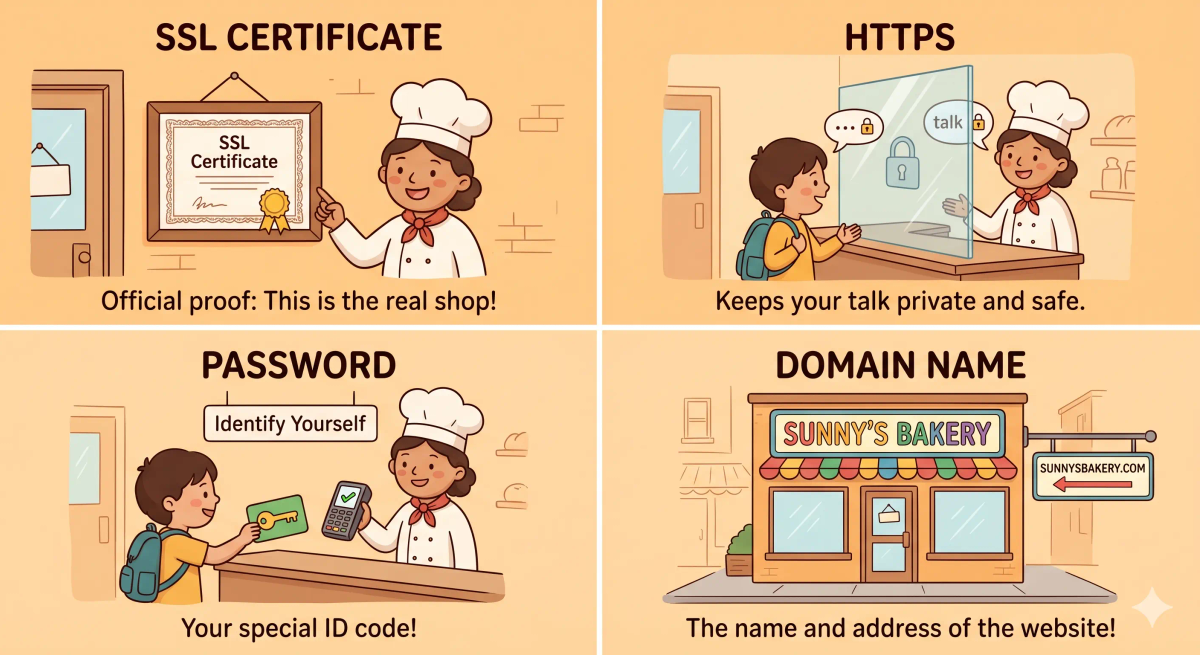
An SSL certificate is not the same as…
- HTTPS — HTTPS is the secure connection, while the SSL certificate helps prove identity and support that connection
- Encryption itself — encryption is the protection applied to data, while the certificate helps establish trust so secure encryption can be used
- A password — a password proves who you are, while the certificate helps prove who the website is
- A domain name — a domain name is the website’s address, while the certificate helps verify that the site at that address is legitimate
So while these ideas are related, an SSL certificate specifically does website identity verification for secure web communication.
Why It Matters
- It helps browsers verify that a website is real
- It supports secure HTTPS connections
- It makes logins, payments, and private browsing safer
- It helps users avoid trusting fake or badly configured websites
This matters because an SSL certificate is one of the quiet building blocks behind a safer web.
The next time you see the lock icon in your browser, remember that a certificate is one of the things helping your browser decide whether it can trust that site.
A Slightly Deeper Version
A slightly deeper way to think about an SSL certificate is that it is a digital certificate used in modern TLS-based secure connections.
It contains information about the domain, the issuer, and a public key. During the HTTPS setup process, the website presents the certificate and the browser checks whether it is valid, trusted, and matches the site being visited.
People still commonly say “SSL certificate,” even though modern secure web connections usually use TLS rather than the older SSL protocols.
Common Questions
What is an SSL certificate in simple words?
An SSL certificate is a digital certificate that helps a browser trust a website and create a secure connection. In simple words, it is like an official certificate shown at a shop entrance to prove the shop is really who it says it is.
Is an SSL certificate the same as HTTPS?
No. An SSL certificate is one important part that helps HTTPS work. HTTPS is the secure connection as a whole, while the certificate helps prove the website’s identity and support encryption.
Why does a website need an SSL certificate?
A website needs an SSL certificate to use HTTPS, protect information sent between the browser and the website, and show visitors that the connection is trusted by the browser.
Does an SSL certificate mean a website is safe?
No. An SSL certificate helps prove identity and secure the connection, but it does not guarantee that the website’s content, business, downloads, or intentions are completely safe.
Why does my browser show an SSL certificate warning?
A browser may show an SSL certificate warning if the certificate is expired, missing, not trusted, set up incorrectly, or does not match the website address you are visiting.
What happens when an SSL certificate expires?
When an SSL certificate expires, browsers may stop trusting the secure connection and show a warning to visitors. The website owner needs to renew or replace the certificate.
Do all websites need an SSL certificate?
Yes, most websites today should have an SSL certificate because any website that wants to use HTTPS needs one. This is especially important for logins, forms, payments, and any page that handles user information.
Can I get an SSL certificate for free?
Yes. Many websites can use free SSL certificates from trusted certificate providers. Free certificates can still support HTTPS, but they must be installed correctly and renewed on time.
In Short
- An SSL certificate is like an official business certificate displayed at a shop entrance
- Its job is to help prove that a website is really who it claims to be
- It helps your browser trust and start a secure HTTPS connection
- It is different from HTTPS, encryption itself, passwords, and domain names
- It matters because it helps make secure web communication possible