 What Is Malware? Explained Simply for Beginners
 Imagine your house is clean and comfortable.
Now imagine tiny destructive pests sneaking into the house.
Some chew the furniture.
Some steal food.
Some multiply and spread into other rooms.
Some hide quietly and cause trouble later.
They are all different kinds of harmful pests, but they share one thing: they do damage inside the house.
That is the easiest way to start understanding malware.
Malware is harmful software designed to damage, disrupt, spy on, or misuse a computer, device, or network.
Main Analogy
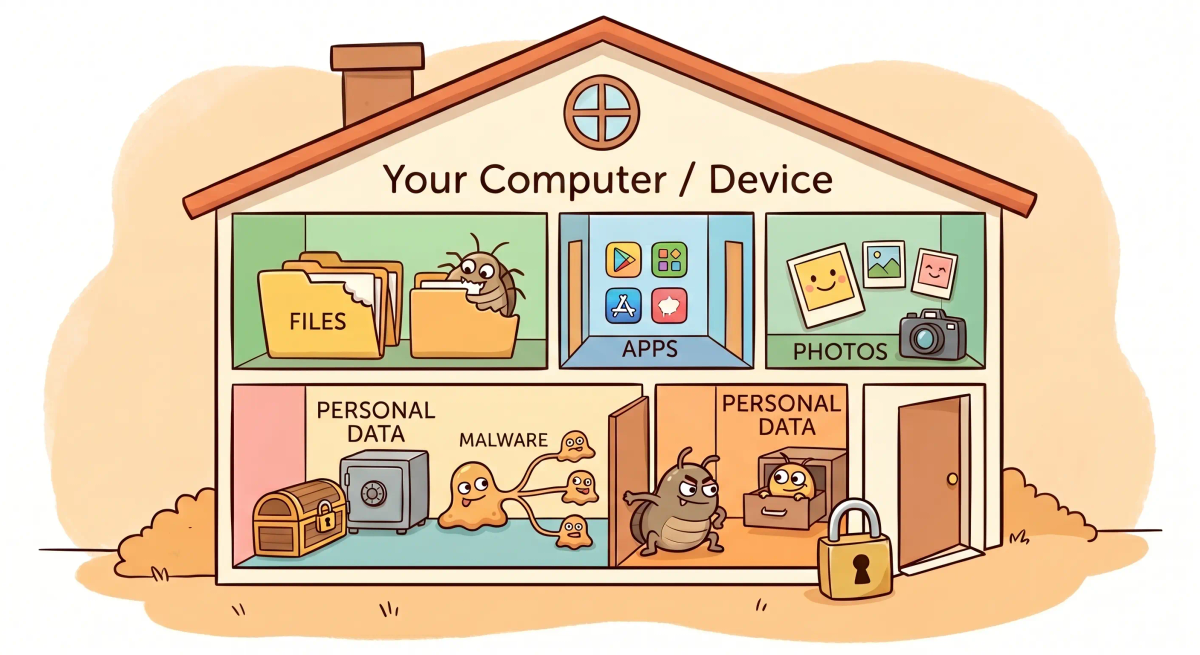
Think of malware like harmful pests getting into a house
- Your computer or phone = the house
- Malware = the harmful pests
- Files, apps, and data = the things inside the house the pests can damage or misuse
- Spreading infection = pests moving into more rooms or nearby houses
- Security tools = cleaners, traps, locks, or guards that stop or remove the pests
So the easiest way to understand malware is to think of it as bad unwanted software that sneaks into a system and causes harm in different ways.
What Problem Does It Solve?
Malware does not solve a good problem for you. It is created to cause bad outcomes for the attacker’s benefit or simply to create harm.
If harmful pests entered a house, they could damage belongings, make the house unsafe, or quietly steal things.
In the real world, malware can damage files, spy on users, slow down devices, steal information, or spread to other systems.
So the key idea of malware is that it is software made to do harmful things, not helpful things.
How It Works in the Story
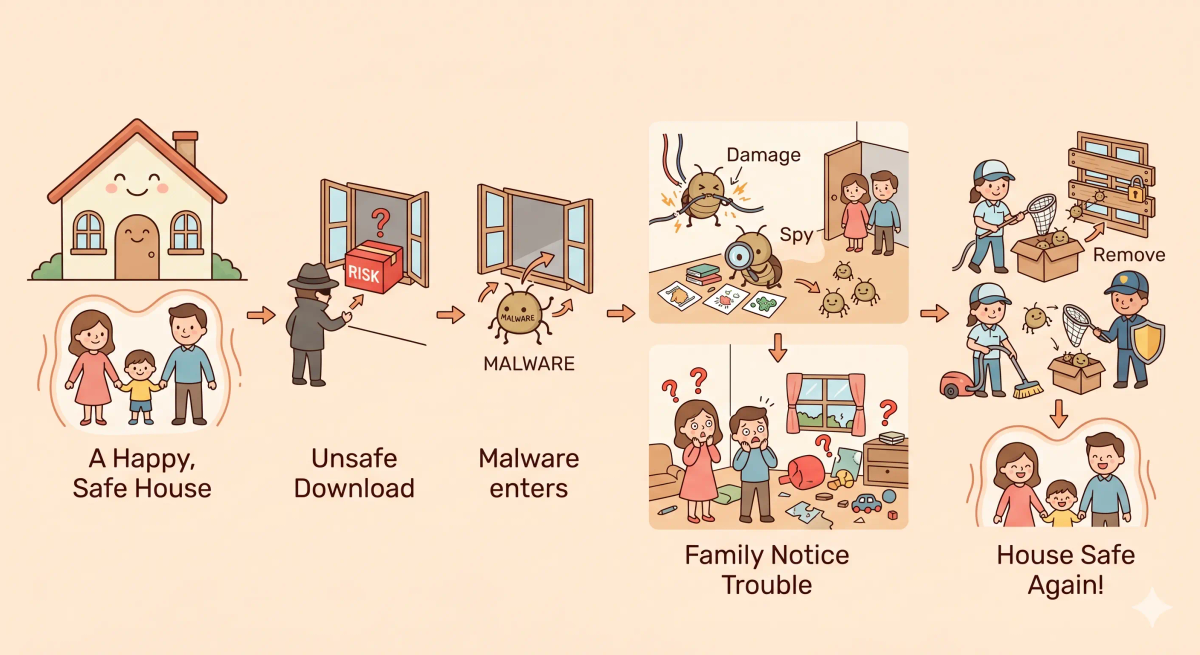
- A harmful pest finds a way into the house.
- It gets inside without being welcome.
- Once inside, it starts causing trouble.
- It may damage things, steal things, hide, or spread.
- The house becomes less safe and less reliable until the pests are stopped.
How It Works in the Real World
- Malware gets onto a device, often through a bad download, malicious email attachment, fake app, unsafe website, or another trick.
- Once it runs, it begins doing harmful actions.
- It may damage data, spy on activity, steal information, interrupt normal work, or spread further.
- Security tools or updates may detect, block, or remove it.
👉 That means malware is harmful software that enters a system and misuses it from the inside.
Real-World Example
Example: Opening a bad email attachment
When someone opens a suspicious email attachment, they may accidentally let harmful software onto their computer.
At that moment, malware may begin running.
If everything goes badly, it can steal information, damage files, or slow down the machine.
That is why people are careful about suspicious links, unsafe downloads, and unknown attachments.
What It Is Not
Malware is not the same as…
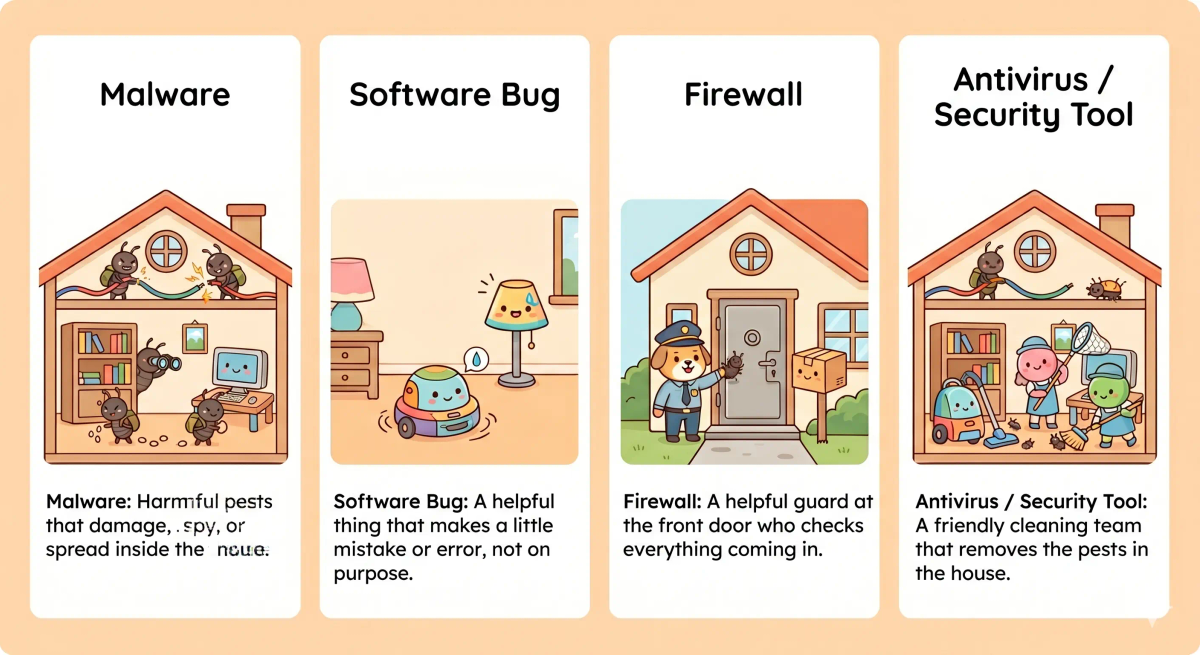
- A normal bug — a bug is an accidental software mistake, while malware is intentionally harmful
- A firewall — a firewall is a protective tool, while malware is the harmful thing it tries to block
- Encryption — encryption protects data, while malware tries to misuse or damage systems
- All software — most software is meant to help the user, while malware is specifically made to cause harm
So while these ideas are related, malware specifically means software designed for harmful behavior.
Why It Matters
- It can damage or disrupt devices
- It can steal information or spy on users
- It can spread and affect more than one system
- It is one of the most important reasons digital security matters
This matters because malware can turn a normal device into an unsafe one.
The next time you hear the word malware, remember that it means harmful software that gets into a device and causes trouble, much like destructive pests getting into a house.
A Slightly Deeper Version
A slightly deeper way to think about malware is that it is an umbrella term for malicious software, including things like viruses, worms, spyware, ransomware, and trojans.
Different kinds of malware behave differently, but they all share the common idea of intentionally harmful or unwanted behavior inside a system.
Common Questions
What is malware in simple words?
Malware is harmful software made to damage, spy on, steal from, or take control of a device. In simple words, it is like a sneaky troublemaker that gets inside your device and does something you did not ask for.
Is malware the same as a virus?
No. Malware is the bigger category, and a virus is one type of malware. Other types include worms, ransomware, spyware, trojans, and adware.
What are common types of malware?
Common types of malware include viruses, worms, trojans, ransomware, spyware, adware, and keyloggers. They all cause harm in different ways, but they are all forms of malicious software.
How does malware spread?
Malware can spread through unsafe downloads, fake apps, email attachments, suspicious links, infected websites, USB drives, or software that has not been updated.
What are signs that a device may have malware?
Signs of malware can include a slow device, strange pop-ups, unknown apps, sudden crashes, changed settings, high battery use, or accounts behaving in unusual ways.
Can phones get malware too?
Yes. Phones and tablets can get malware, especially through unsafe apps, suspicious links, fake updates, risky downloads, or weak security settings.
How do you remove malware?
You can try removing malware by disconnecting from the internet, deleting suspicious apps or files, running trusted security software, updating the device, and changing important passwords. Serious infections may need expert help.
How can people avoid malware?
People can avoid malware by downloading apps from trusted sources, avoiding suspicious links and attachments, keeping software updated, using security tools, and being careful with unexpected messages or files.
In Short
- Malware is like harmful pests getting into a house
- Its job is not to help — it is made to damage, spy, disrupt, or misuse
- It can sneak in through risky links, files, or apps
- It is different from normal bugs, firewalls, and security tools
- It matters because it can make devices unsafe and unreliable