 How DNS Works: Explained Simply for Beginners
 Imagine you want to visit your friend Mia.
You know her name. You do not remember her full street address. So before you can go to her house, you ask someone who knows where everyone lives. A moment later, you have the right address and you are on your way.
That hidden little journey is almost exactly how DNS works every time you open a website.
DNS works by translating a website name like
google.cominto the IP address a computer needs, so your request can reach the right server.
Main Analogy
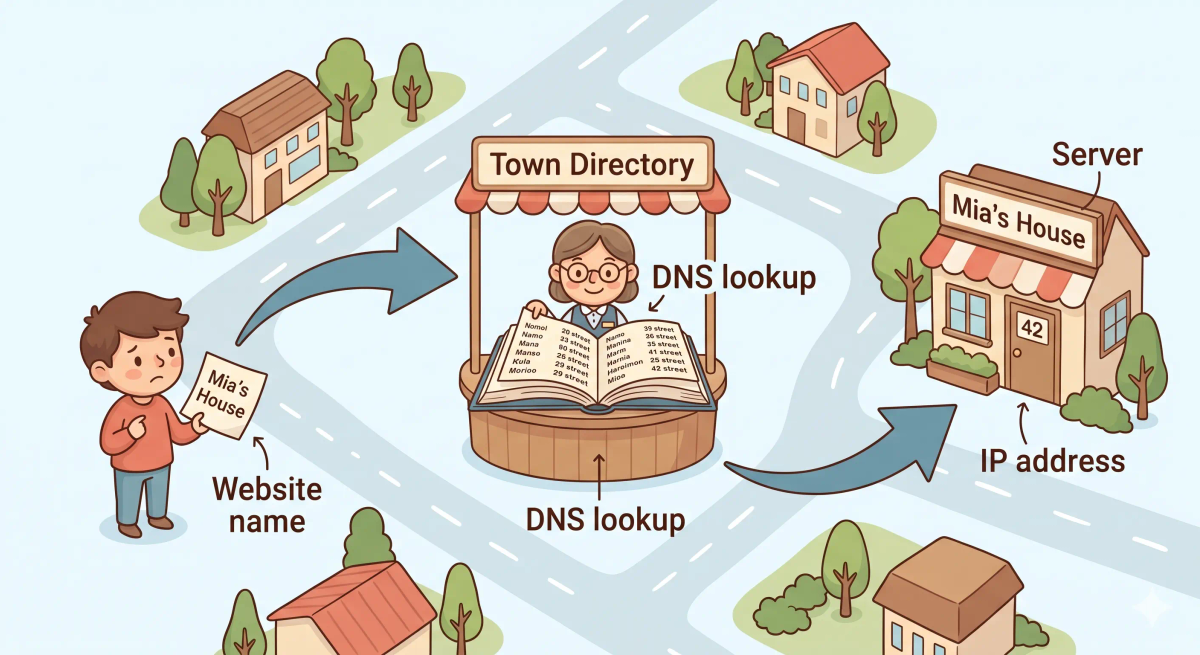
Think of how DNS works like asking a town directory for someone’s home address
- A person’s name = a domain name like
youtube.com - A home address = an IP address
- The person trying to visit = your browser or device
- The town directory helper = DNS
So the easiest way to understand how DNS works is to imagine someone looking up a name in a town directory so they can find the correct house.
Meet the Key Players
Before we follow the journey, let’s meet the important parts:
- Your browser — the part that wants to open a website
- Domain name — the easy human-friendly name, like
wikipedia.org - DNS resolver — the helper that starts looking for the answer
- DNS records — the stored information that links a name to an IP address
- IP address — the number-based destination the computer needs
- Server — the computer that actually sends the website back to you
These are the main characters in the story. Once you know who they are, the journey becomes much easier to follow.
What Problem Does This Process Solve?
If there were no town directory helper, then people would have to memorize the exact street address of every house, shop, and building in town. That would be exhausting.
In the real world, that means we would have to remember long IP addresses for every website we want to visit.
Instead of typing a simple name like google.com, we would need to remember a number.
So DNS works the way it does because it needs to make the internet easier for humans while still giving computers the exact numeric destination they need.
Before the Process Begins
The process begins when you type a website name into your browser, like youtube.com, and press Enter.
In the story world, that is like walking up to the town directory desk and saying, “I want to go to Mia’s Bakery, but I only know the name.” That starting moment sets the whole journey in motion.
How It Works in the Story
- A visitor wants to go to a place in town and knows only the place’s name.
- The visitor asks the town directory helper for the real street address.
- The helper checks the big directory book.
- If the answer is already easy to find, the helper gives the address quickly.
- If not, the helper may check bigger town records to make sure the answer is correct.
- Once the address is found, the visitor can travel to the right building.
This is why the journey feels simple from the outside even though a few invisible steps happen in the middle.
How It Works in the Real World
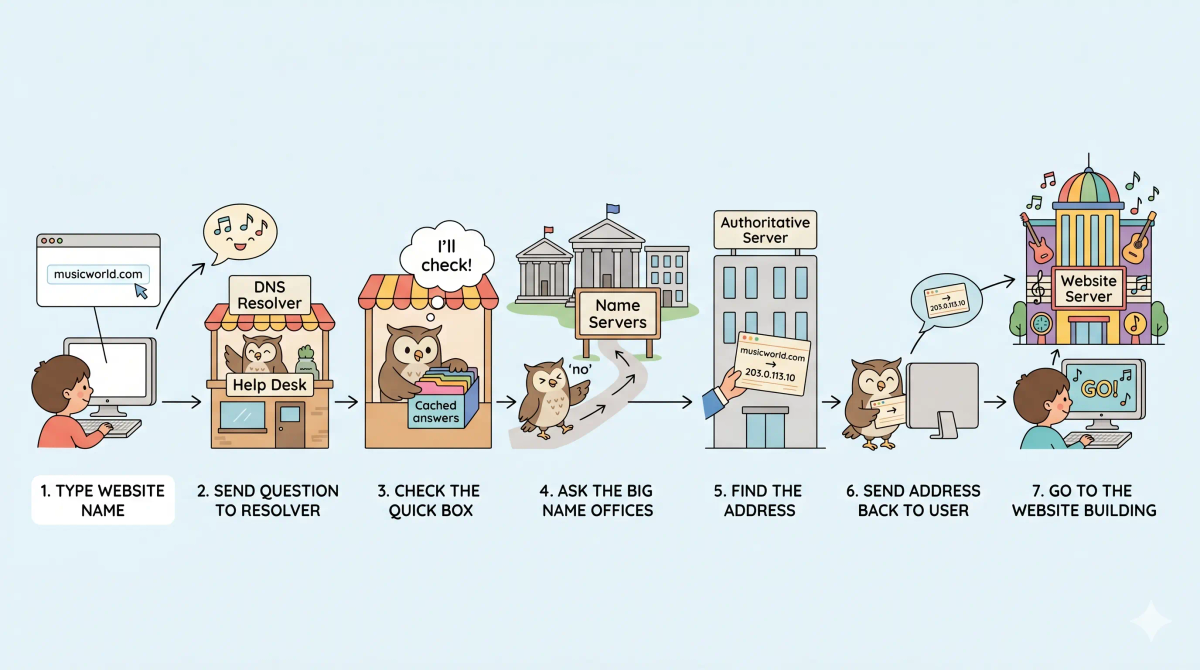
- You type a domain name like
example.cominto your browser. - Your device asks a DNS resolver to find the matching IP address.
- The resolver checks whether it already knows the answer from a recent lookup.
- If it does not, it asks other DNS servers until it finds the correct DNS record.
- The matching IP address is returned to your device.
- Your browser then uses that IP address to send the request to the correct server.
👉 That means DNS takes a request from a website name typed by a human to the correct numeric destination used by computers through a series of small, fast steps.
Real-World Example
Example: Opening YouTube
When you type youtube.com, your device does not magically know where YouTube lives.
First, it needs the correct IP address.
Then DNS begins its process: your browser asks a DNS resolver, the resolver finds the matching record, and the IP address comes back. Once that happens, your browser can send the real request to YouTube’s server.
If everything works properly, the page begins loading almost immediately. All of this usually happens so quickly that you never notice it.
Where the Process Can Slow Down or Go Wrong
Sometimes the process is not instant. In the story world, that could happen if the town helper does not have the answer nearby, needs to check other record offices, or gets handed an old address.
In the real world, delays or errors can happen when a DNS server is slow, a DNS record is outdated, or your device is using the wrong DNS settings. That is why DNS can sometimes feel slow, broken, or confusing.
For example, if the name points to the wrong address, it is like being sent to the wrong building in town. If the helper cannot find any address at all, the trip stops before it even begins.
What It Is Not
DNS is not the same as…
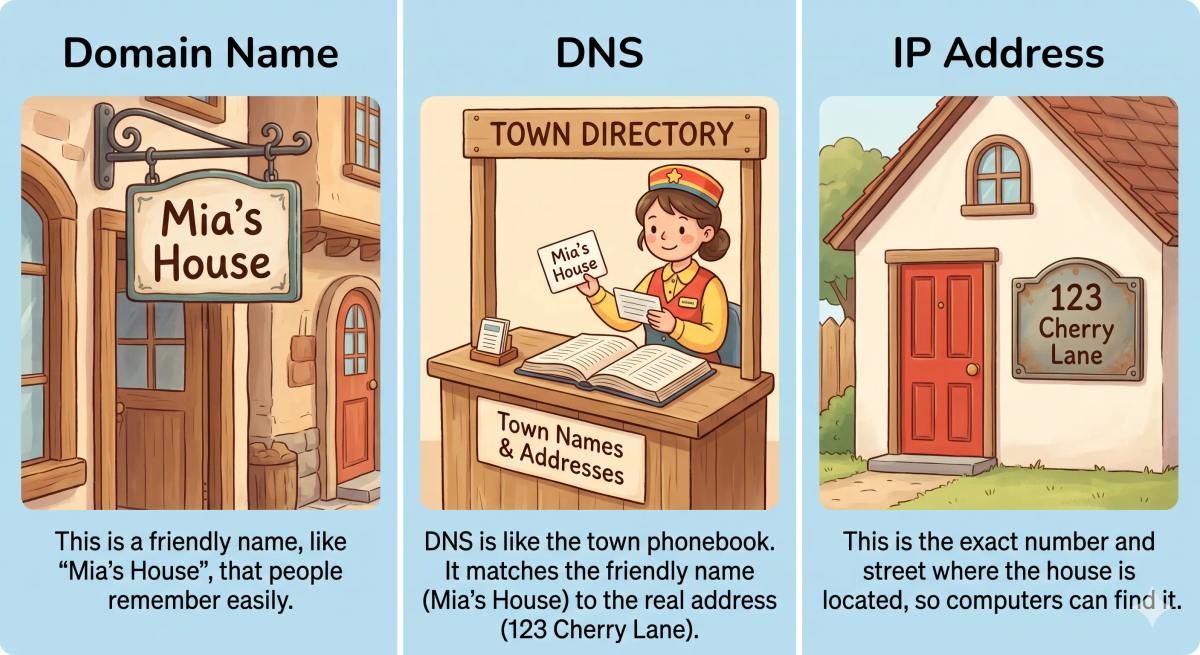
- IP address — the IP address is the actual numeric destination; DNS helps find it
- Domain Name — the domain name is the human-friendly name; DNS translates it
- Browser — the browser shows the website; DNS helps the browser find where to go
- Internet — the internet carries the traffic; DNS helps choose the right destination first
So while these are related, DNS specifically explains the process of turning a website name into the address needed to reach the correct server.
Why This Process Matters
- It lets humans use easy website names instead of hard-to-remember numbers
- It helps browsers find the correct server quickly
- It makes the web feel simple even though the system behind it is detailed
- It keeps the internet usable at huge scale
This matters because DNS quietly helps almost every website visit begin correctly. The next time you type a website name into your browser, remember that this whole invisible lookup process is what helps make that visit possible.
A Slightly Deeper Version
A slightly deeper way to understand how DNS works is that it is a distributed naming system. It takes a domain name as input, checks stored DNS records through resolvers and name servers, and returns the IP address that should be contacted next.
Because many answers are temporarily remembered through caching, DNS often feels nearly instant. That caching is one reason the lookup can be fast most of the time.
Common Questions
What starts DNS working?
DNS starts working when your device needs the IP address for a domain name, usually right after you type a website into your browser or an app tries to connect to a service.
Does DNS happen every time?
Often yes, but not always from scratch. If the answer was recently found, a cached result may be used instead.
Is DNS the same as an IP address?
No. DNS finds the IP address. The IP address is the actual numeric destination.
Why can DNS sometimes be slow or fail?
It can slow down or fail if the DNS server is unavailable, the answer is outdated, the lookup must travel through more steps, or the device has incorrect DNS settings.
In Short
- DNS works like a town directory lookup
- It starts when you type a website name
- It finds the correct IP address through a quick lookup process
- It finishes by helping your browser reach the right server
- It matters because it makes the web easy for humans to use