 What Is a MAC Address? Explained Simply for Beginners
 Imagine a parking lot full of cars.
From far away, people may only care which street or parking area a car is in.
But inside the parking lot, if you want to identify one exact car, you look at its license plate.
That plate is attached to the car itself.
It is not the same thing as the parking spot, and it is not the same as the road address of the whole building.
That is the easiest way to start understanding a MAC address.
A MAC address is a unique hardware identifier used to identify a device on a local network.
Main Analogy
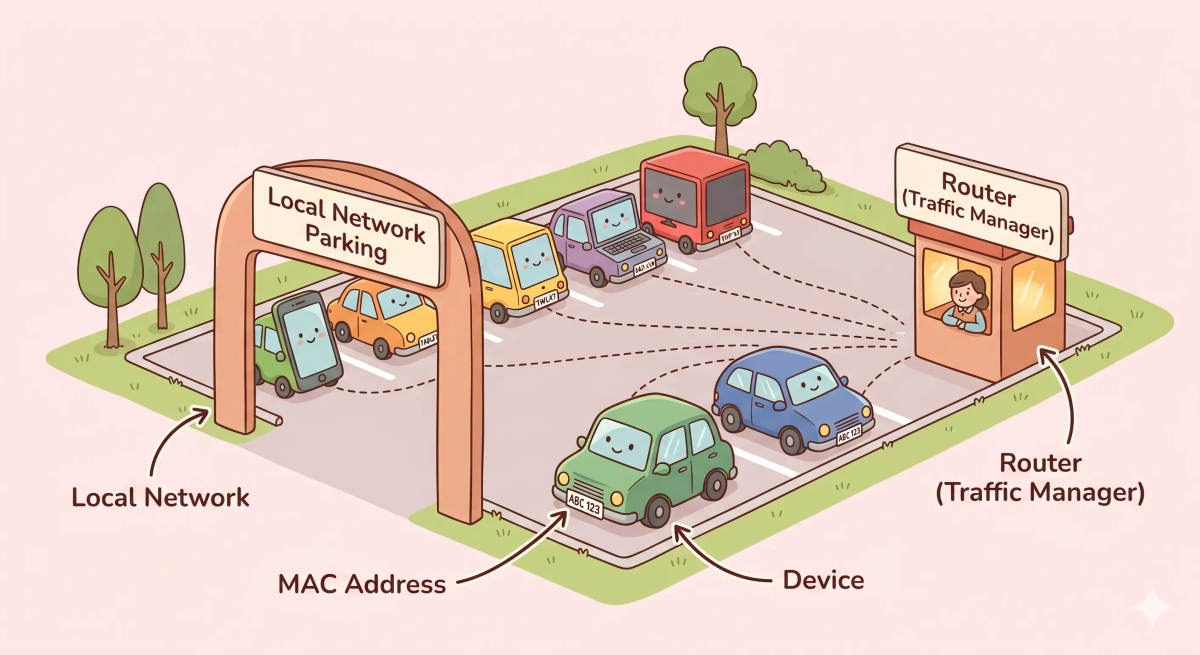
Think of a MAC address like a car’s license plate inside a parking area
- Device = the car
- MAC address = the license plate attached to that car
- Local network = the parking lot where nearby cars and systems see each other
- IP address = more like the temporary location or network address used for reaching the car in the wider system
- Router or switch = the parking attendant managing local traffic
So the easiest way to understand a MAC address is to think of it as the device’s built-in local identity tag.
What Problem Does It Solve?
If cars in a parking lot had no license plates or unique identity markers, it would be harder to tell one car apart from another nearby.
The parking staff would see cars, but not know which exact one was which.
In the real world, devices on a local network need a way to identify each other at the hardware level.
So the job of a MAC address is to give each network device a built-in local identity.
How It Works in the Story
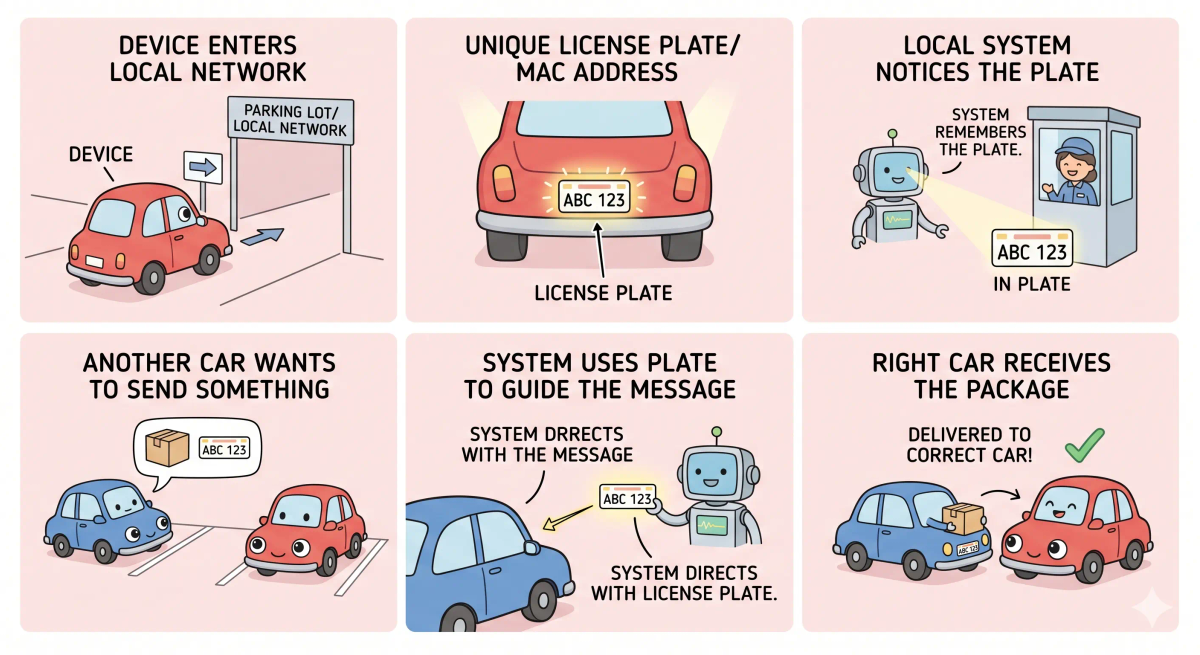
- Many cars enter the same parking lot.
- Each car has its own license plate.
- The parking staff checks the plates to tell the cars apart.
- When something needs to reach one exact car in the lot, the local system uses the car’s plate identity.
- That helps local traffic and device recognition work properly.
How It Works in the Real World
- A device joins a local network, such as Wi-Fi or Ethernet.
- That device has a MAC address attached to its network hardware.
- Nearby network equipment uses MAC addresses to identify devices on the local network.
- This helps local delivery and device-to-device communication work correctly.
👉 That means a MAC address helps devices be recognized locally on the network.
Real-World Example
Example: Joining home Wi-Fi
When your phone joins your home Wi-Fi, the network needs a way to recognize that exact device at the local level.
At that moment, the device’s MAC address helps identify its network hardware on that local connection.
If everything matches the expected behavior, the network can treat your phone as one specific device among many others nearby.
If not, local communication and device tracking on the network would become much more confusing.
What It Is Not
A MAC address is not the same as…
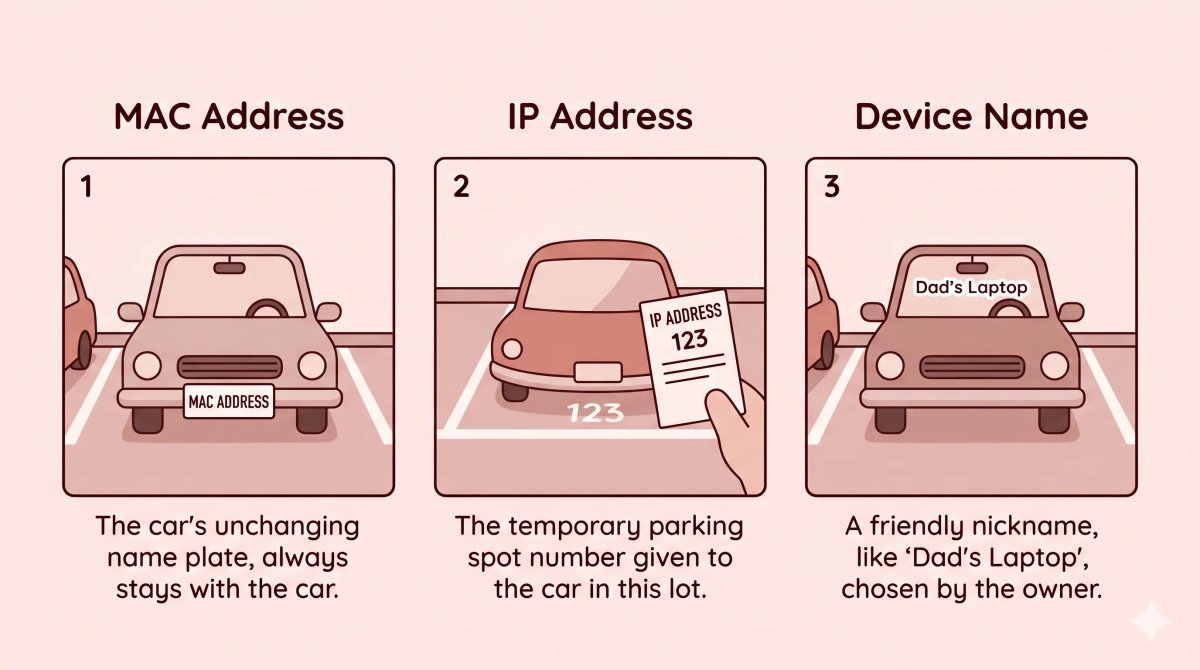
- IP address — an IP address is used for network addressing and can change, while the MAC address is the device’s hardware identity on the local network
- Device name — a device name is a human-friendly label, while a MAC address is a lower-level identifier
- Wi-Fi password — a Wi-Fi password allows access, while a MAC address identifies the device hardware
- The internet address of the device — a MAC address is mainly for local network identification, not global internet routing
So while these ideas are related, a MAC address specifically does local hardware identification.
Why It Matters
- It helps local network hardware identify devices
- It supports local communication on Wi-Fi and Ethernet
- It lets routers, switches, and nearby systems tell devices apart
- It is one of the basic identifiers used in local networking
This matters because a MAC address is one of the ways network hardware recognizes devices nearby.
The next time you join a local network, remember that your device brings along its own built-in local identity tag.
A Slightly Deeper Version
A slightly deeper way to think about a MAC address is that it is a link-layer hardware identifier associated with a network interface.
It is commonly used on local networks so nearby systems can identify which device interface they are communicating with. That is why MAC addresses matter most inside local network segments, rather than as internet-wide addresses.
Common Questions
What is a MAC address in simple words?
A MAC address is a unique identifier for a device’s network interface. In simple words, it is like a license plate for a device inside a local network.
What is a MAC address used for?
A MAC address helps devices identify each other on the same local network, such as your home Wi-Fi, office network, or school network.
Is a MAC address the same as an IP address?
No. A MAC address identifies a device interface on a local network, while an IP address helps route data across networks and the wider internet.
What is the difference between a MAC address and an IP address?
A MAC address is like a device’s local license plate, while an IP address is like a delivery address used to send data across networks. MAC addresses matter locally; IP addresses help data travel farther.
Does every device have a MAC address?
Most network-enabled devices have a MAC address for each network interface. For example, a laptop may have one MAC address for Wi-Fi and another for Ethernet.
Can a MAC address change?
The built-in hardware MAC address is tied to the network interface, but many devices can temporarily use a different or randomized MAC address for privacy.
Is a MAC address used across the whole internet?
No. A MAC address mainly matters inside the local network. Once data moves beyond your router, IP addresses are used to route it across the wider internet.
Is a MAC address private?
A MAC address can identify a device on a local network, so it should not be treated as completely private. Many modern devices use MAC randomization to reduce tracking on Wi-Fi networks.
In Short
- A MAC address is like a car’s license plate in a parking lot
- Its job is to identify a device locally on the network
- It helps nearby network systems tell devices apart
- It is different from an IP address, a device name, and a Wi-Fi password
- It matters because local network communication needs device-level identity