 What Is a Proxy? Explained Simply for Beginners
 Imagine you are in a large office building with a helpful front desk concierge.
You want to ask another office for some information, but instead of walking there yourself, you hand your request to the concierge.
The concierge takes the request, speaks to the other office on your behalf, gets the answer, and brings it back to you.
From the other office’s point of view, they interacted with the concierge first, not directly with you.
That is the easiest way to start understanding a proxy.
A proxy is an intermediary server that receives your request, passes it along on your behalf, and then returns the response back to you.
Main Analogy
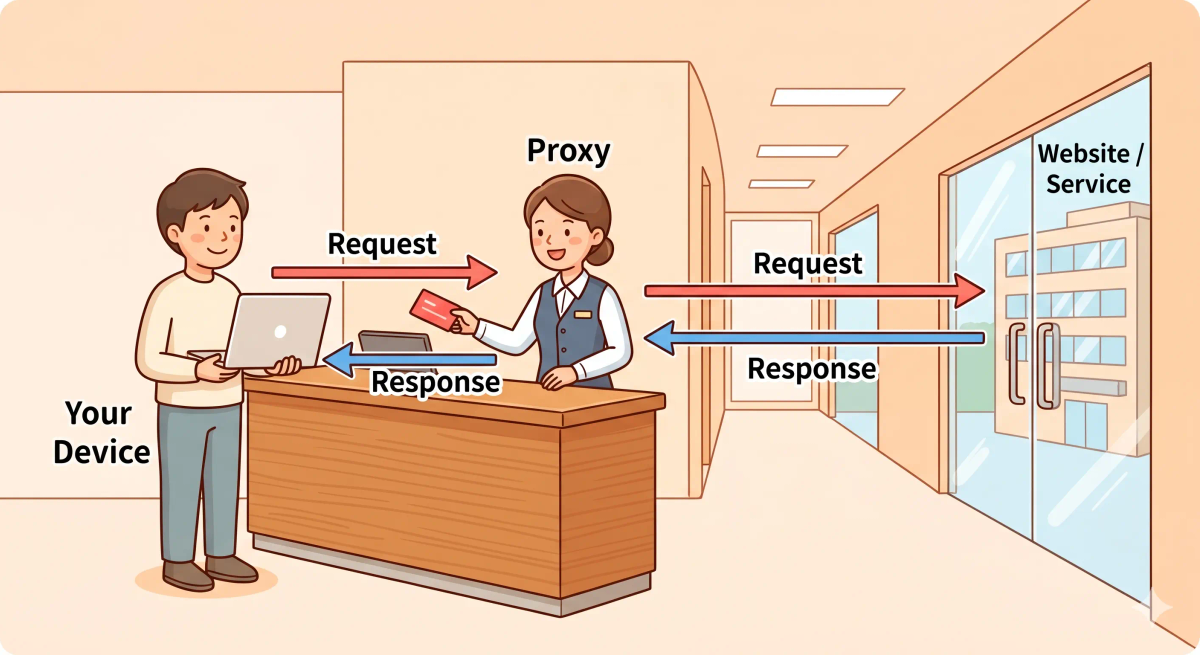
Think of a proxy like a front-desk concierge who makes requests for you
- Your device or browser = you standing at the front desk
- Proxy server = the concierge handling the request for you
- Website or service = the outside office being contacted
- Request and response = the message you hand over and the answer brought back
- Intermediary role = the concierge standing between you and the outside office
So the easiest way to understand a proxy is to think of it as a middle helper that speaks to the destination on your behalf instead of you speaking to it directly.
What Problem Does It Solve?
If everyone had to walk directly to every office in the building, it could be harder to control who talks to whom, harder to hide where requests started, and harder to manage repeated errands efficiently.
A front desk helper can make things simpler by standing in the middle.
In the real world, a proxy can help act as the middle layer between users and websites or services. That can be useful for privacy, filtering, access control, caching, or routing requests through a different place.
So the job of a proxy is to stand in the middle and handle requests on your behalf.
How It Works in the Story
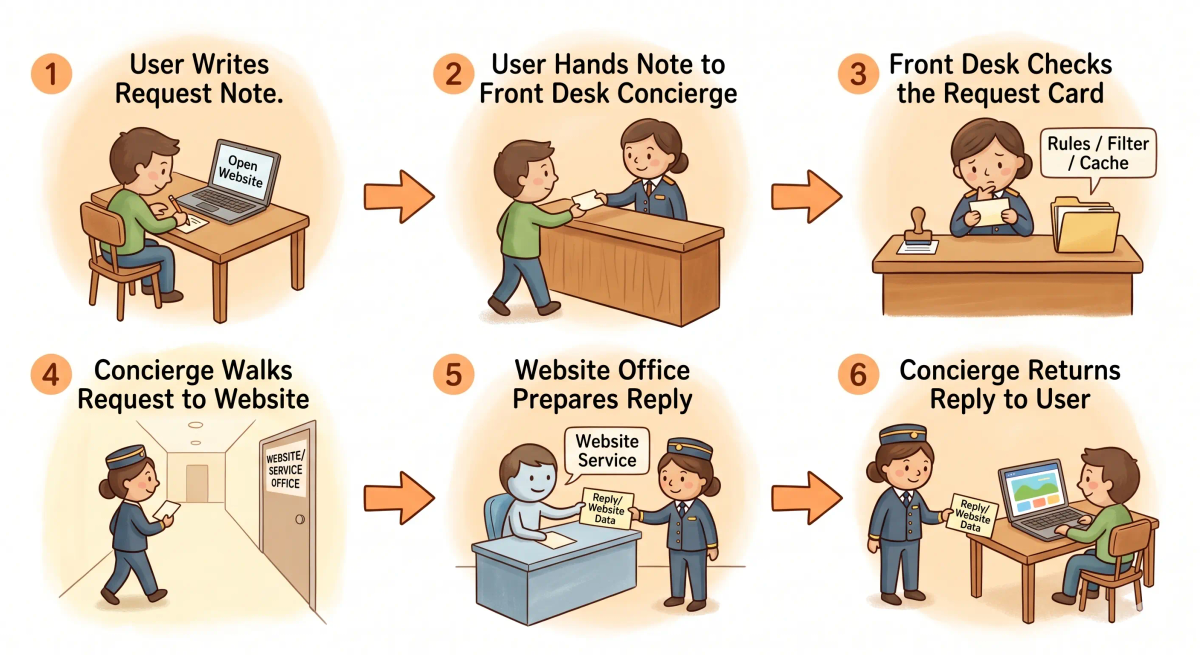
- You arrive at the front desk with a request.
- You hand the request to the concierge instead of going to the office yourself.
- The concierge reviews the request and decides what to do.
- The concierge contacts the outside office on your behalf.
- The office sends its answer back to the concierge.
- The concierge returns the answer to you.
How It Works in the Real World
- Your browser or app sends a request.
- Instead of going directly to the website, the request goes first to a proxy server.
- The proxy server receives the request and may inspect, filter, or modify it based on rules.
- The proxy sends the request onward to the destination service.
- The destination sends its response back to the proxy.
- The proxy passes the response back to your browser or app.
👉 That means a proxy helps handle communication in the middle instead of letting every request go directly from you to the destination.
Real-World Example
Example: Opening a blocked or filtered website at school or work
When you try to open a website on a school or office network, your request may not go directly from your browser to the website.
At that moment, a proxy may sit in the middle and decide whether to pass the request through, block it, or return a saved copy.
If everything matches the expected behavior, the proxy forwards the request and the website loads.
If not, the proxy may stop the request or show a message saying the site is blocked.
What It Is Not
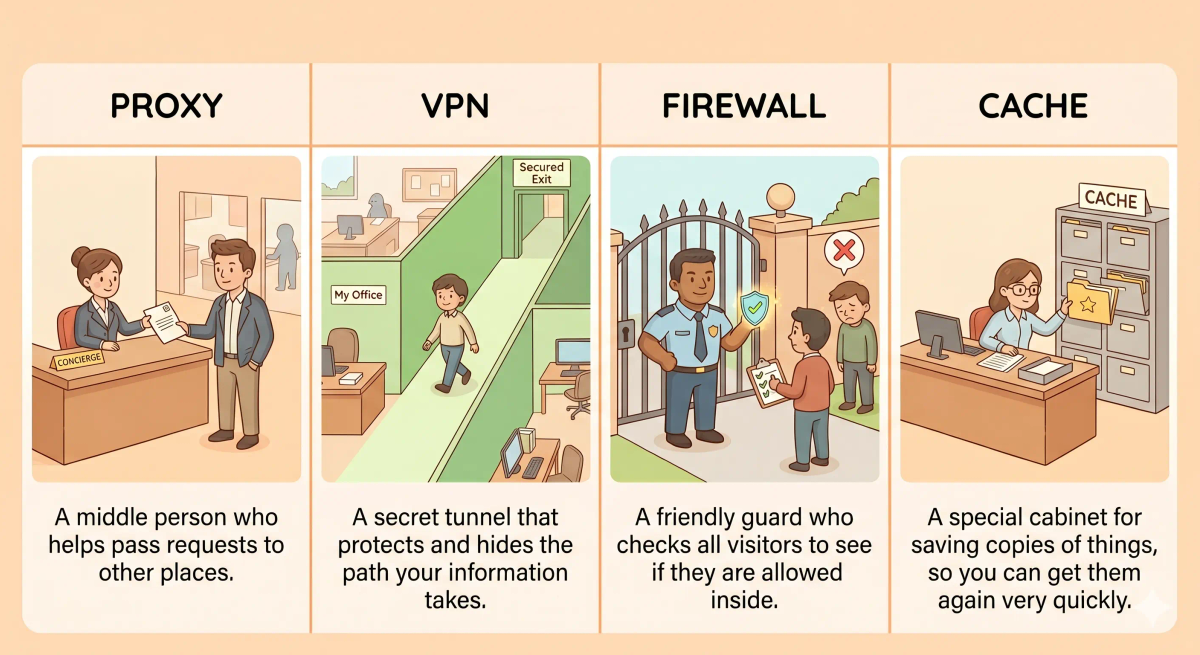
A proxy is not the same as…
- VPN — a vpn creates a protected tunnel for your traffic, while a proxy mainly acts as an intermediary for requests
- Firewall — a firewall mainly filters and blocks traffic, while a proxy actually receives and forwards requests on your behalf
- Browser — the browser is the app you use, while the proxy is the middle server handling the request
- Cache — a cache stores reusable copies of data, while a proxy is the middle system that may or may not use caching as one feature
So while these ideas are related, a proxy specifically does middleman request handling.
Why It Matters
- It can hide direct contact between the user and the destination
- It can help filter or control requests
- It can improve speed when combined with caching
- It can help organizations manage traffic in one central place
This matters because a proxy gives networks and apps a useful middle layer for handling requests more deliberately.
The next time you hear that traffic is going “through a proxy,” remember that it means a middle helper is speaking to the destination on your behalf.
A Slightly Deeper Version
A slightly deeper way to think about a proxy is that it is an intermediary server placed between a client and a destination server.
The client sends the request to the proxy first. The proxy may inspect it, enforce rules, log it, cache results, change headers, or forward it onward. Then it receives the response and passes it back to the client.
That is why proxies are commonly used for filtering, privacy, shared network control, and performance improvements.
Common Questions
What is a proxy in simple words?
A proxy is a middle server that sends requests for you. In simple words, it is like a messenger who goes to another place on your behalf and brings the answer back.
What does a proxy server do?
A proxy server sits between your device and the website or service you are trying to reach. It can forward requests, hide your direct IP address, filter traffic, block websites, or cache content to make repeated requests faster.
Is a proxy the same as a VPN?
No. A proxy and a VPN both sit between you and the destination, but they are not the same. A VPN usually protects more of your device’s traffic through an encrypted tunnel, while a proxy usually handles specific requests or apps.
Does a proxy hide my IP address?
Often yes. A proxy can make the destination see the proxy server’s IP address instead of your direct IP address. But this depends on the proxy type, setup, and whether other tracking methods are still being used.
What is the difference between a forward proxy and a reverse proxy?
A forward proxy sits in front of users and sends requests outward for them. A reverse proxy sits in front of servers and handles incoming requests before they reach the actual website or app server.
Can a proxy block websites?
Yes. Proxies can be used to block websites, filter content, or control access to certain services. Schools, offices, and organizations often use proxies for this.
Can a proxy make the internet faster?
Sometimes. A proxy can make things faster if it caches frequently requested content and serves it again without fetching it from the original website every time.
What are common examples of proxies?
Common proxy examples include school or office web filters, caching proxies, reverse proxies in front of websites, and proxies used by apps or browsers to route certain requests.
In Short
- A proxy is like a front-desk concierge who makes requests for you
- Its job is to stand in the middle between you and the destination
- It helps forward, filter, hide, or sometimes speed up requests
- It is different from a VPN, firewall, browser, and cache
- It matters because it adds a useful middle layer to network communication